Website Redesign Without the SEO Nightmare: How to Upgrade Safely
A website redesign can improve branding, usability, mobile experience, page speed, and conversions. It can also lead to a significant decline in organic traffic when SEO is considered only after the new site has launched.
The risk is not the visual redesign itself. Search engines do not reduce rankings because a website looks different. Problems arise when the redesign changes URLs, content, internal links, metadata, crawlability, page templates, or other signals that helped the old website rank.
A successful redesign should improve the website without erasing the search visibility it has already earned.
That requires SEO planning before development is complete, careful validation before launch, and monitoring after the redesigned site goes live.
Why Website Redesigns Can Affect Search Rankings
Search engines use many signals to understand a website and determine which pages should appear for particular searches.
These signals include:
- Page URLs
- Title tags and headings
- Main page content
- Internal links
- Backlinks
- Canonical tags
- Structured data
- Crawlability
- Indexation settings
- Page speed
- Mobile usability
- Site architecture
A redesign may change several of these elements at once.
For example, a new design may replace detailed service pages with shorter visual layouts. A simplified navigation may remove links to important pages. A new content management system may generate different URLs. A staging configuration may accidentally prevent the live site from being indexed.
The more elements that change during a redesign, the greater the need for structured SEO planning.
Redesign scope | SEO risk | Main concerns |
| Visual changes only | Lower | Page speed, mobile layout, hidden content |
| New theme or page builder | Moderate | Headings, metadata, schema, performance |
| Navigation and structural changes | Moderate to high | Internal links, crawl depth, orphan pages |
| Content and URL changes | High | Redirects, lost relevance, backlinks |
| CMS or domain migration | Very high | Indexation, signal transfer, canonicalization |
A redesign that preserves URLs, content, metadata, and internal links may cause little disruption. A redesign, combined with a CMS migration, a domain change, or major URL restructuring, requires far more preparation.
Start With a Baseline of the Existing Website
Before changing the website, document how the current version performs.
A pre-redesign baseline helps identify which pages and signals must be protected. It also makes it easier to diagnose problems after launch.
The baseline should include:
- Organic traffic by landing page
- Rankings for priority keywords
- Pages receiving search impressions
- Pages generating leads or sales
- URLs with backlinks
- Indexed pages
- Existing redirects
- Title tags and headings
- Canonical tags
- Internal links
- Structured data
- XML sitemaps
- Page speed data
A complete crawl of the existing website is especially useful. It creates a record of URLs, status codes, metadata, internal links, indexation directives, and technical elements.
After launch, the redesigned website can be crawled again and compared with the original version.
Without this baseline, it becomes difficult to determine whether a missing page, a changed title, a broken link, or an indexation issue was introduced during the redesign.
Identify Pages That Must Be Protected
Not every page has equal SEO or business value.
Before deciding which pages to keep, merge, rewrite, or remove, review their performance.
High-value pages may include:
- Main service pages
- Product or category pages
- Location pages
- Blog articles with organic traffic
- Pages with strong backlinks
- Pages ranking for commercial keywords
- Pages generating leads or revenue
- Pages linked from important third-party sources
- Pages receiving significant Search Console impressions
For every important page, decide:
- Will its URL remain the same?
- Will its content be preserved?
- Will the page be expanded or shortened?
- Will it be merged with another page?
- Will a redirect be required?
- Will internal links still point to it?
- Will it remain indexable?
A page should not be removed simply because it looks outdated or does not fit neatly into the new navigation. Its search value should be evaluated first.
Keep Important URLs Stable When Possible
Changing URLs adds risk.
If a page already ranks well, has backlinks, and will continue to serve the same purpose after the redesign, keeping its existing URL is usually the safest choice.
For example, a service page does not need a new URL simply because its layout and copy are being updated.
When URLs must change, each old address should be mapped to the closest relevant new page using a permanent 301 redirect.
Good redirect mapping looks like this:
Old page | Appropriate destination |
| Existing service page | Redesigned version of the same service |
| Old product category | Closest equivalent category |
| Updated blog post | New URL for the same article |
| Two merged pages | New consolidated page |
| Discontinued product | Relevant replacement or category |
| Obsolete page with no replacement | 404 or 410 may be appropriate |
Redirecting every removed page to the homepage is generally not a good solution. The homepage may not satisfy the original page’s intent, and search engines may treat the redirect as irrelevant.
A redirect map should be created before launch and tested immediately afterward.
Preserve the Content That Supports Rankings
Modern redesigns often favor short copy, large visuals, and minimalist layouts.
This can improve presentation, but reducing page content too aggressively may weaken search relevance.
A page may rank because it contains:
- Detailed service information
- Product or category descriptions
- Frequently asked questions
- Location-specific details
- Comparison sections
- Supporting subtopics
- Case studies
- Trust signals
- Relevant internal links
- Terminology associated with the topic
The redesigned page does not need to copy the old version word for word. Content can be improved, reorganized, and made easier to read.
However, the new version should continue answering the same search intent.
Useful content can be incorporated into accordions, comparison tables, FAQs, process sections, or supporting blocks below the main conversion area. Good design and detailed content do not have to conflict.
Protect Internal Links and Site Architecture
Internal links help search engines discover pages, understand relationships between topics, and determine which pages are most important.
A redesign can unintentionally weaken internal linking when:
- Navigation is simplified
- Footer links are removed
- Breadcrumbs disappear
- Links from blog posts are deleted
- Service cards are rebuilt without crawlable links
- Important pages move deeper into the site
- JavaScript replaces standard HTML links
- Related-page sections are removed
Compare the old and proposed site structures before launch.
Important pages should remain accessible through logical links from the homepage, navigation, relevant articles, service pages, categories, and breadcrumbs.
A redesigned website should make the information architecture clearer, not make priority pages harder to reach.
Review Metadata, Headings, and Templates
A new CMS, theme, or template can overwrite carefully optimized on-page elements.
Common issues include:
- Generic title tags
- Missing meta descriptions
- Duplicate titles across many pages
- Multiple H1 headings
- H1S replaced with vague marketing slogans
- Incorrect canonical tags
- Missing structured data
- Staging URLs in metadata
Before launch, review representative pages from every major template type.
These may include:
- Homepage
- Service page
- Location page
- Product page
- Category page
- Blog article
- Contact page
Check the page source or rendered HTML rather than relying only on CMS settings. A field may look correct in the admin area while the public template outputs something different.
Involve SEO Before the Final Launch Stage
SEO review is most useful while changes can still be made without delaying the launch.
A small visual redesign with unchanged URLs may be manageable with an internal checklist. More complex projects require deeper validation.
Projects involving URL restructuring, a CMS change, a domain move, or a large number of indexed pages may benefit from SEO support for website redesigns to identify risks related to redirects, crawlability, canonicalization, content transfer, and internal linking before launch.
Specialist involvement is particularly useful when several changes are happening simultaneously. Once the redesigned site is live and rankings have fallen, recovery may take longer because search engines must recrawl pages, process corrected redirects, and reassess the new structure.
Check Staging and Indexation Controls
Redesigned websites are normally built on a staging environment.
Staging sites should usually be protected from search engine indexing. The problem occurs when those restrictions remain active on the live website.
Before launch, check for:
- Meta robots noindex tags
- X-Robots-Tag headers
- Robots.txt blocks
- Password protection
- CMS privacy settings
- Staging canonical URLs
- Staging XML sitemaps
- Staging internal links
- Temporary development redirects
A live site can appear fully functional to visitors while still telling search engines not to index its pages.
Indexation settings should be reviewed immediately before launch and checked again after the domain points to the new website.
Validate Canonical Tags and XML Sitemaps
Canonical tags should identify the correct live version of each page.
After redesign, they should not point to:
- The staging domain
- The old domain
- HTTP versions
- Redirected URLs
- Unrelated pages
- Duplicate parameter URLs
The XML sitemap should contain only canonical, indexable pages that return a successful 200 status code.
It should exclude:
- Staging URLs
- Redirected pages
- Noindex pages
- Broken pages
- Duplicate versions
- Test content
After launch, submit or review the sitemap in Google Search Console and inspect priority URLs individually.
Test Mobile Experience and Page Speed
A redesign may look excellent on a desktop while creating mobile or performance problems.
Review mobile pages for:
- Visible main content
- Working navigation
- Readable text
- Accessible forms
- Tap-friendly buttons
- Stable layouts
- Crawlable internal links
- Reasonable loading speed
- Non-intrusive popups
Redesigns often introduce heavier images, videos, animations, fonts, sliders, and scripts. These elements may improve appearance while increasing page weight and interaction delays.
Compare performance before and after the redesign rather than relying on a single isolated score.
Important checks include:
- Server response time
- Largest Contentful Paint
- Interaction to Next Paint
- Cumulative Layout Shift
- Image sizes
- Script execution
- Third-party tools
- Mobile performance
A redesigned site should ideally improve both user experience and technical efficiency.
Verify Analytics and Conversion Tracking
A redesign can break measurement even when rankings remain stable.
After launch, verify:
- Google Analytics
- Google Tag Manager
- Contact form events
- Phone-click tracking
- Ecommerce transactions
- Newsletter signups
- Download events
- Call tracking
- CRM integrations
- Thank-you pages
- Consent settings
If Analytics reports a major decline but Search Console clicks remain stable, the issue may be tracking rather than lost visibility.
Testing should take place on staging and again after launch.
Crawl the New Website After Launch
Manual testing alone rarely catches every issue.
A post-launch crawl can reveal:
- Missing pages
- 404 errors
- Incorrect redirects
- Redirect chains
- Missing title tags
- Duplicate metadata
- Noindex pages
- Canonical errors
- Broken internal links
- Sitemap inconsistencies
- Unexpected URL changes
- Missing structured data
Compare the new crawl with the pre-redesign crawl.
The first crawl should take place shortly after launch, followed by another after priority issues have been corrected.
Monitor Rankings, Traffic, and Indexation
Some short-term ranking movement can occur after a substantial redesign. A sharp or sustained decline requires investigation.
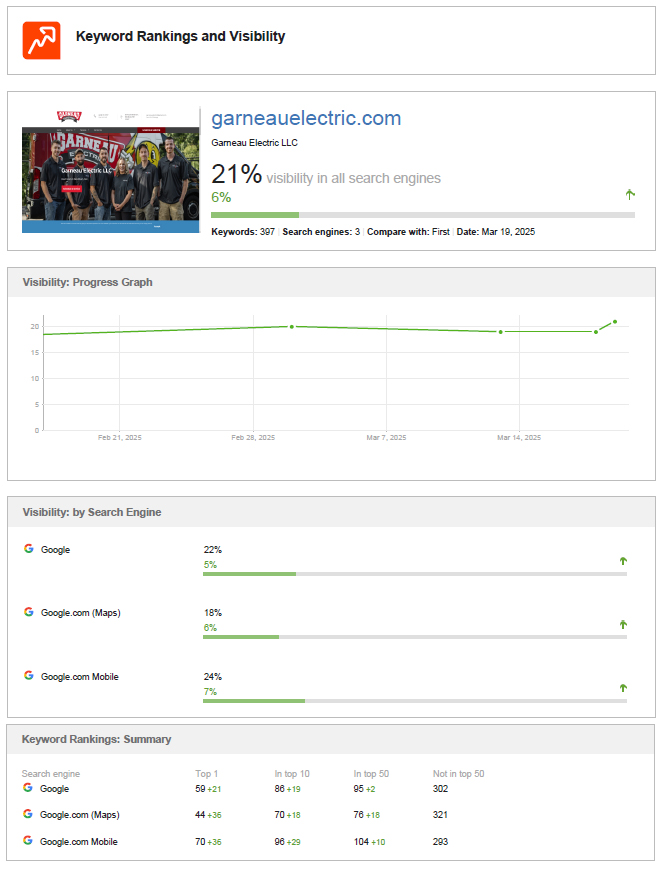
Monitor:
- Organic traffic
- Search Console clicks
- Search impressions
- Priority keyword rankings
- Indexed page counts
- High-value landing pages
- Conversions
- Crawl errors
- Google-selected canonicals
- Server errors
- Page speed
The timing and pattern of the decline can help identify the cause.
A sitewide decline may suggest broad crawlability, indexation, domain, or technical problems. A decline limited to specific pages may indicate missing redirects, lost content, weaker internal linking, or a shift in search intent.
Pre-Launch and Post-Launch Checklist
A structured checklist helps keep redesign work organized.
Before launch | After launch |
| Crawl the existing website | Crawl the redesigned website |
| Identify high-value pages | Test old URLs and redirects |
| Export traffic and ranking data | Verify indexability |
| Review backlink destinations | Check canonical tags |
| Prepare URL redirect mapping | Review XML sitemap processing |
| Preserve important content | Inspect priority pages in Search Console |
| Review metadata and headings | Test analytics and conversions |
| Protect internal links | Monitor rankings and organic traffic |
| Test mobile layouts | Check server and crawl errors |
| Compare page speed | Correct high-priority issues quickly |
The redesign should not be considered complete when the site goes live. It is complete when the new website is crawlable, indexable, measurable, and performing as expected.
Common Website Redesign Mistakes to Avoid
The most common preventable mistakes include:
- Changing URLs without redirects
- Removing pages with rankings or backlinks
- Replacing useful content with thin copy
- Weakening internal links
- Publishing generic titles and headings
- Leaving noindex tags active
- Blocking important pages in robots.txt
- Pointing canonicals to staging
- Submitting an incorrect sitemap
- Removing structured data
- Making the new site slower
- Hiding important content on mobile
- Breaking analytics
- Launching without a post-launch crawl
Avoiding these errors is usually easier than recovering after organic traffic declines.
Redesign the Website Without Resetting Its SEO
A website redesign should improve how the business presents itself, serves users, and converts visitors. It should not reset years of search progress.
The safest approach is to document the existing website, preserve high-value pages, limit unnecessary URL changes, map redirects, retain useful content, and validate technical settings before launch.
SEO, design, development, and content teams should work from the same migration plan. When each team makes changes independently, important signals can be lost between stages.
A well-managed redesign can make the website faster, clearer, and more effective while preserving the rankings, traffic, backlinks, and authority already built.
Frequently Asked Questions
A redesign doesn’t inherently hurt your SEO, but structural changes do. If you alter URLs, remove high-performing content, or change your internal link structure without an SEO migration plan, your rankings and organic traffic can drop significantly.
If a redesign is done correctly, any minor fluctuation in traffic should stabilize within 2 to 4 weeks as search engines recrawl the new site. However, if critical 301 redirects were missed or structural errors were made, the traffic drop can be permanent until those issues are fixed.
A 301 redirect permanently sends users and search engines from an old URL to a new one. During a website launch, they are crucial because they pass the “link equity” (ranking power) from your old pages to your new ones, ensuring you don’t lose your Google rankings or end up with 404 errors.
Whenever possible, keep your top-performing URLs unchanged. If you must change your URL structure for rebranding or better organization, you must map out a strict one-to-one 301 redirect plan from the old URLs to the new ones before going live.
- Your pre-launch checklist should include:
- Backing up your current site data and crawling your old URLs.
- Setting up a 301 redirect map.
- Keeping “noindex” tags on your staging site so search engines don’t index it early.
- Auditing page speed and mobile responsiveness.
- Ensuring metadata (title tags and meta descriptions) is transferred over.
Yes, but be careful with pages that already rank well. If a page is currently driving significant organic traffic, removing its primary keywords, headings, or shrinking the content down to thin copy can cause it to lose its rankings immediately. Optimize your content, but preserve its core value.
A staging site is a private clone of your website used for development and testing. It allows your design, development, and SEO teams to test new layouts, fix broken links, and verify technical elements safely before pushing the website live to the public.
Immediately post-launch, you should:
- Remove the “noindex” tags so search engines can crawl the live site.
- Run a full post-launch site crawl to check for broken links or 404 errors.
- Submit your new XML sitemap to Google Search Console.
- Verify that your Google Analytics and conversion tracking codes are working perfectly.
Use Google Search Console and Google Analytics to look at your traffic over the past 12 months. Identify the pages that drive the most organic impressions, clicks, and conversions, as well as the pages with the most external backlinks. These are your priority pages that must be protected.
You should involve an SEO specialist at the very beginning of the planning phase, before any design or development work starts. Waiting until right before or right after a website launch to think about SEO is the number one reason website migrations fail.
Conclusion
Ultimately, a website redesign should be an exciting step forward for your business—not a hazard to your hard-earned search presence. By taking a proactive approach, documenting your current site baselines, and meticulously mapping out your redirects, you can launch a modern, fast, and high-converting website without resetting years of SEO progress. When design, development, and SEO teams work from the exact same playbook, your new site won’t just protect its current rankings; it will build the perfect foundation for future growth.