How to Audit Image Optimization for Search Visibility
Images are not a decorative afterthought. They can earn visibility in Google Images, appear beside standard search results, strengthen product and article pages, and help a potential customer understand an offer faster than a block of copy.
They are also expensive when handled badly. The 2025 Web Almanac found that the median desktop home page transferred 1,058 KB of images, while the median mobile home page transferred 911 KB. Images accounted for more transferred data than JavaScript, fonts, CSS, or HTML on both device types.
An image audit therefore has two jobs. It must establish whether search engines can discover, understand, and present your images, while ensuring those assets remain useful and fast for real people. The process below gives you a repeatable way to do both without resorting to keyword-stuffed alt text or indiscriminate compression.
Mapping Images Already Appearing in Search
Start by taking stock, much as you would inventory a warehouse before changing its layout. You need a defensible baseline showing which landing pages already receive image-search visibility, which queries produce it, and which assets are likely responsible.
Open Google Search Console’s Performance report, set the search type to Image, and choose a date range long enough to smooth out weekly noise. An experienced SEO agency will usually export query, page, country, and device data before touching a template, since a clean baseline makes every later decision easier to defend.
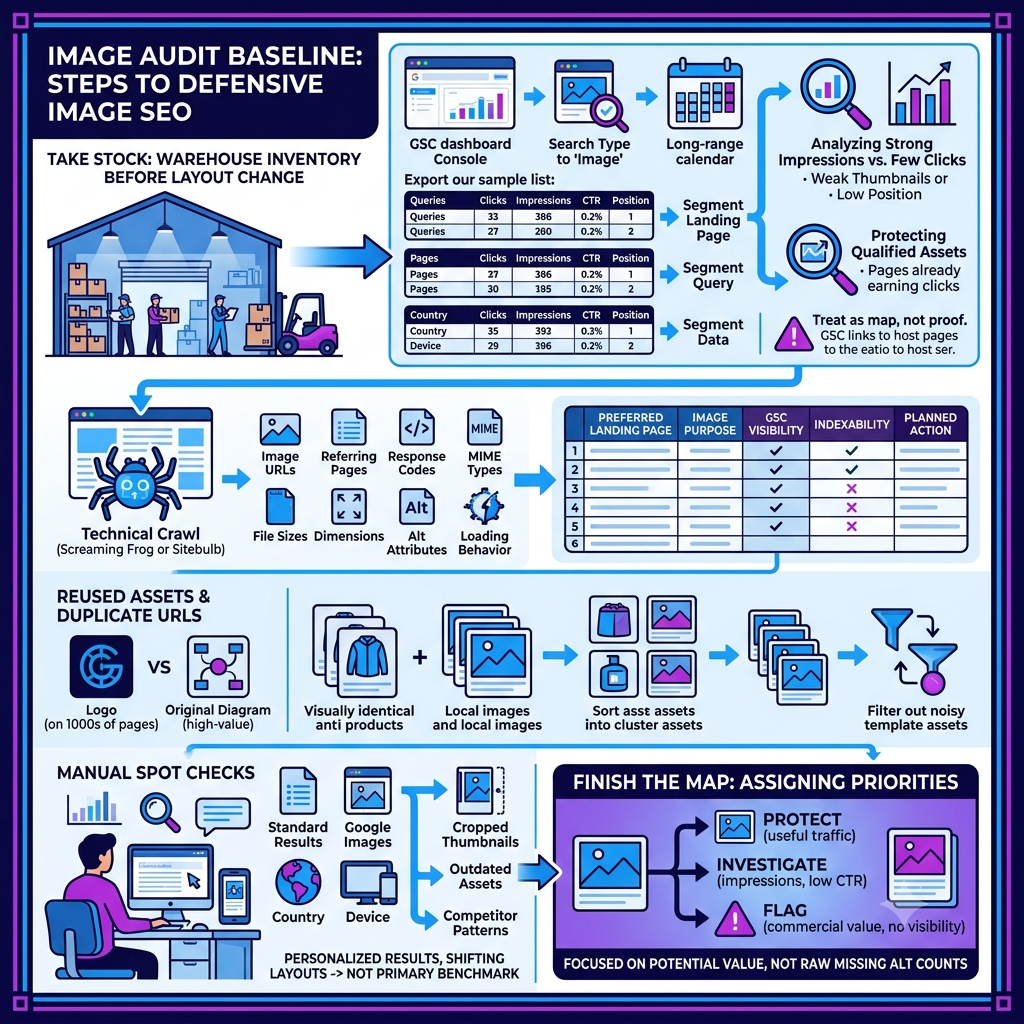
Record clicks, impressions, click-through rate, and average position for the site as a whole. Then segment the data by landing page and query. Pages with strong impressions but few clicks may have a weak thumbnail, poor intent alignment, or simply a low position, while pages already earning qualified clicks are assets you should protect during redesigns and migrations.
Search Console does not provide a perfect image-file inventory. Google explains that performance data is assigned to the canonical URL of the link, and an image result ultimately links to the image within its host page. Treat the report as a map of landing-page and query performance, not proof that a particular JPEG or WebP file earned every recorded impression.
Pair the report with a technical crawl. Screaming Frog, Sitebulb, or a comparable crawler can collect image URLs, referring pages, response codes, MIME types, file sizes, dimensions, alt attributes, and loading behavior. Add the results to a working sheet with one row per image and columns for the preferred landing page, image purpose, Search Console visibility, indexability, and planned action.
Reused assets deserve careful handling. A logo may appear on thousands of pages without being a search opportunity, while one original diagram on a high-value guide may deserve immediate attention. Group duplicate URLs and visually identical variants so template assets do not drown out the product photographs, local project images, charts, and illustrations that could satisfy a real search need.
Use manual searches only as spot checks. Review a sample of priority queries in standard results and Google Images, note the visible thumbnail and destination page, and test from the relevant country and device where possible. Personalized results and shifting layouts make manual rankings unsuitable as your primary benchmark, but they are useful for spotting cropped thumbnails, outdated assets, and obvious competitor patterns.
Finish the map by assigning priorities. Protect images that already drive useful traffic, investigate pages with substantial impressions but weak click-through rates, and flag commercially important pages with no image visibility at all. This approach keeps the audit focused on potential value rather than the raw number of missing alt attributes.
Checking Image Discovery and Crawl Access
A useful image behind a locked door has no chance of being selected for search. Discovery checks establish whether Google can reach the landing page, find a stable image URL in rendered HTML, fetch the file, and associate it with the correct context.
Begin with the markup. Google’s image SEO guidance says it can discover images referenced in the src attribute of a standard <img> element, including an <img> inside <picture>. CSS background images are not indexed as images, so a meaningful product photo or illustration should not exist only as a background declaration.
Responsive delivery still needs a dependable fallback. Check that srcset and <picture> implementations retain an <img> element with a valid src, then confirm that each candidate returns a successful response and the expected image content type. Pay special attention to CDN hostnames, expiring signed URLs, hotlink protection, redirect chains, case-sensitive paths, and image URLs generated only after a user action.
Lazy loading is helpful below the fold, but the implementation must not hide assets from crawlers. Google’s lazy-loading documentation warns against relying on scrolling or clicking to load relevant content because Google Search does not interact with the page. Test representative URLs with Search Console’s URL Inspection tool and confirm that the rendered HTML contains the intended image URL in the src attribute.
Review robots.txt for rules affecting both Googlebot and Googlebot-Image. Inspect page-level robots directives for noimageindex, and check image responses for an X-Robots-Tag: noindex header. Restrictions may be deliberate for licensed, confidential, or low-value assets, so the goal is not to remove every block. The goal is to distinguish intentional controls from old staging rules, CDN defaults, or migration mistakes.
A blocked file and a noindex response header should not be applied together without thought. Google must crawl an image URL to read its X-Robots-Tag, so blocking the same URL in robots.txt prevents that header from being seen. Document the business decision behind every exclusion and use one durable control that matches the intended outcome.
Image sitemaps can help with assets that are difficult to discover, especially images introduced through JavaScript or hosted on a separate CDN. Google permits image entries in an existing sitemap or a dedicated image sitemap, and its image sitemap documentation recommends verifying external image-hosting domains in Search Console. Do not treat a sitemap as a ranking shortcut; it supports discovery but cannot compensate for a thin, irrelevant, or inaccessible landing page.
Stable URLs make the entire system easier to audit. Avoid creating a new primary image address whenever an editor changes a crop or compression setting unless your versioning process requires it. Persistent URLs preserve crawl continuity, reduce duplicate variants, and make it easier to compare performance before and after a controlled update.
Evaluating Alt Text and Surrounding Content
Alt text works like a concise explanation offered when the visual itself is unavailable. Its first responsibility is accessibility, and its search value comes from describing the image accurately in the context of the page.
Classify each image by purpose before judging its wording. The W3C alt decision tree recommends a brief contextual description for informative photographs and simple graphics, text that communicates the action or destination for functional images, and an empty alt attribute for purely decorative or redundant images. Complex charts should have their essential information available in nearby HTML rather than trapped inside the graphic.
An empty alt attribute and a missing alt attribute are not the same decision. alt=”” tells assistive technology that an image can be skipped, while a missing attribute may cause a screen reader to announce an unhelpful filename. Audit the intended purpose, not just whether the field contains characters.
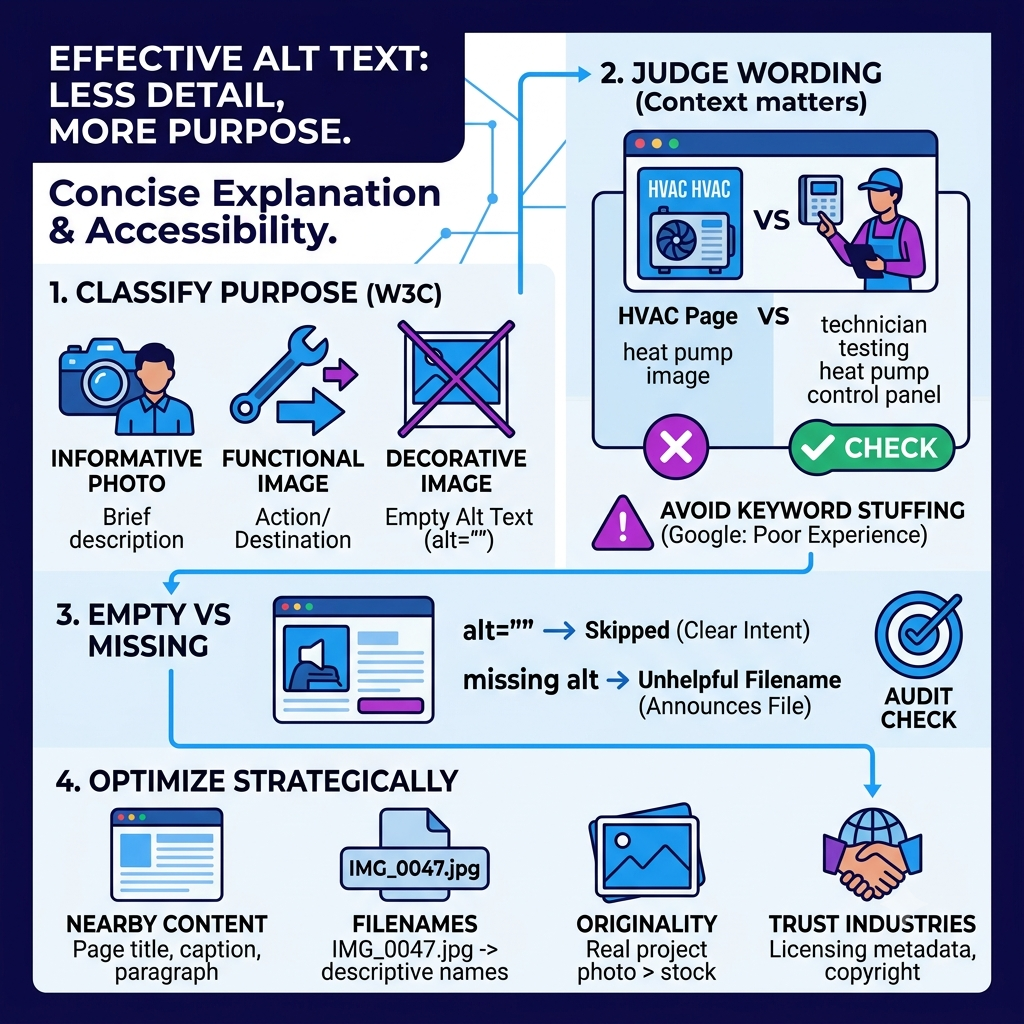
Write descriptions that identify what matters on this page. “Technician testing a residential heat pump control panel” is more useful on an HVAC service page than “heat pump image,” but extra keywords, city names, and service terms should not be appended unless they describe what a person can actually see. Google explicitly warns that keyword stuffing in alt text creates a poor experience and may look spammy.
Nearby content carries much of the meaning. Review the page title, main heading, caption, paragraph before and after the image, link context, and any structured data that identifies a product, recipe, article, or organization. A relevant image on a focused page has a clearer purpose than the same file placed in a generic gallery with no explanation.
Filenames provide a light clue, not a strategy by themselves. Replace opaque names such as IMG_0047.jpg with short, descriptive filenames during a planned upload or migration, but do not break established URLs merely to add keywords. Accurate captions, useful page copy, and a coherent subject are usually more important than squeezing another phrase into a file path.
Originality also matters to the person choosing a result. A real project photograph, legible comparison chart, or carefully produced product image can answer questions that a generic stock photo cannot. If you use AI-generated or heavily edited visuals, make sure they do not imply evidence, facilities, outcomes, or people that do not exist.
Higher-trust industries need extra review. Healthcare, legal, financial, and regulated service pages should use imagery that is accurate, appropriately licensed, privacy-safe, and consistent with the claims on the page. Publishers and photographers can also use Google-supported image licensing metadata or embedded IPTC fields to communicate creator, credit, copyright, and licensing information.
Reviewing Image Quality, Dimensions, and Performance
Serving one enormous image everywhere is like sending a moving truck to deliver an envelope. The asset may look fine, but the unnecessary weight slows the page and wastes data, especially on mobile connections.
Inspect intrinsic dimensions against the largest rendered size on each template. A 3,000-pixel source displayed in a 400-pixel card is a clear resizing opportunity, although high-density screens may need a candidate around twice the rendered width. Use srcset and sizes so the browser can choose an appropriate file rather than downloading the desktop original for every viewport.
Modern formats can reduce transfer size, but format choice should follow the content. AVIF and WebP are useful for photographs and many illustrations, while SVG suits logos and simple vector graphics. Keep a compatible fallback where necessary, make sure the file extension matches the real format, and test transparency, color, fine text, and sharp edges before a bulk conversion.
Compression needs a visual quality check. There is no universal file-size threshold or quality setting that works for every photograph, diagram, and product shot. Compare several output levels at the dimensions users will actually see, then choose the smallest version that remains crisp and trustworthy.
Check layout stability at the same time. Images without reserved space are a common cause of Cumulative Layout Shift, the visible movement that occurs when content jumps as an asset arrives. Add intrinsic width and height attributes or reserve the correct ratio in CSS; web.dev’s CLS guidance sets a good field threshold at 0.1 or less for at least 75 percent of visits.
Prioritize the image most likely to become the Largest Contentful Paint element. LCP measures when the largest image or text block in the initial viewport renders, and current guidance defines a good result as 2.5 seconds or less for at least 75 percent of visits. Do not lazy-load the primary hero image, make it discoverable in the initial HTML, and use fetchpriority=”high” only when testing confirms it is the critical LCP resource.
Below-the-fold images are better lazy-loading candidates. Native loading=”lazy” is often simpler than a JavaScript library, but reserve dimensions so delayed files do not shift the layout. Check that placeholders do not remain indexed as the final asset and that the full image loads when it approaches the viewport without requiring a click.
Test representative templates in PageSpeed Insights and Chrome DevTools, then compare lab findings with field data from the Chrome User Experience Report or your own real-user monitoring. A Lighthouse run helps identify the LCP element, oversized files, and loading delays, but field data shows what visitors experience across devices, networks, and longer sessions.
Review caching and delivery after optimizing the files themselves. Long-lived cache headers for versioned assets, a properly configured CDN, and minimized redirect chains can prevent repeated downloads and slow starts. Keep the human result in view: a fast blurry thumbnail that misrepresents the product is not an optimization win.
Measuring Search Visibility After Image Updates
Measurement is the scoreboard, but only if the rules stay consistent. Record what changed, when it went live, which templates or URLs were affected, and which pages were deliberately left untouched for comparison.
Start with discovery validation. Reinspect a sample of updated pages in Search Console, confirm that the rendered HTML contains the intended assets, and monitor sitemap or crawl errors for the main domain and any verified CDN property. Recrawling and reprocessing take time, so avoid declaring success or failure from the first few days of data.
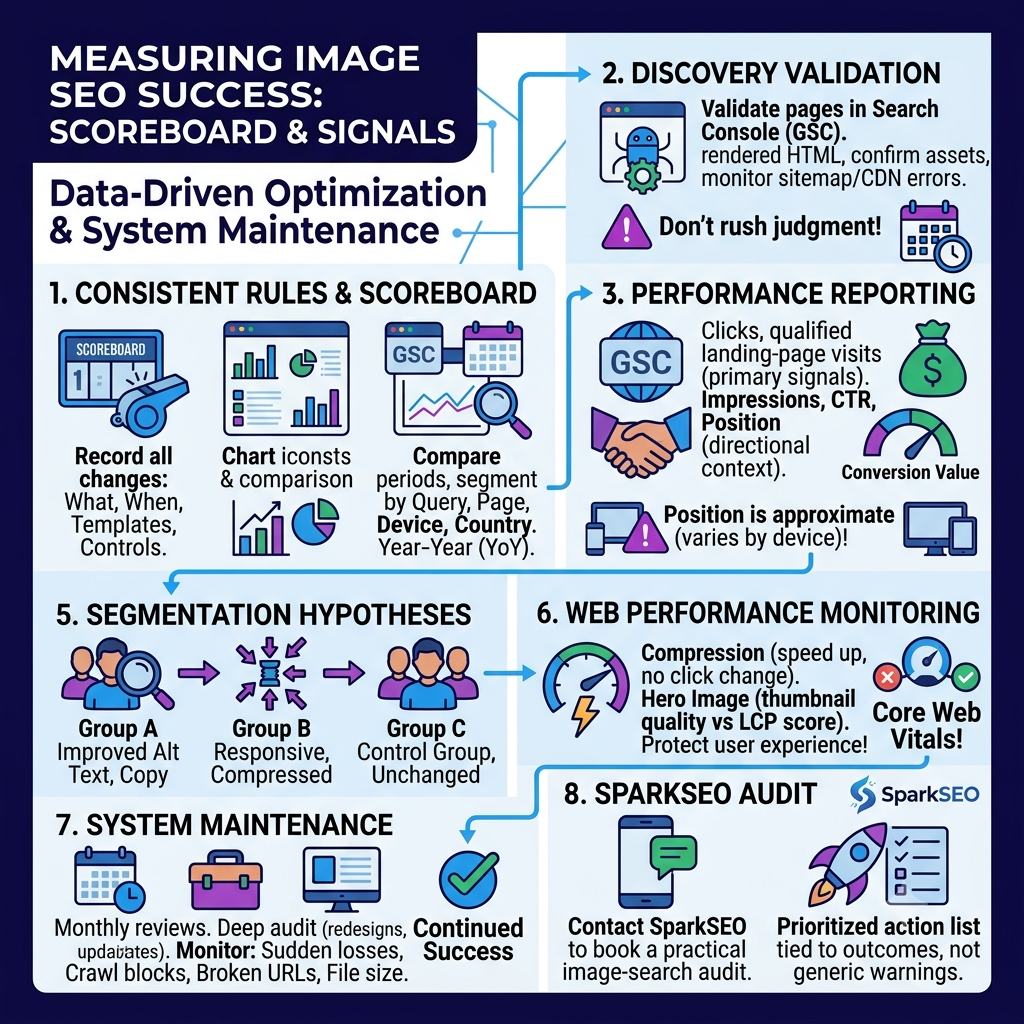
Return to the Performance report with search type set to Image. Compare equivalent periods and segment results by query, page, device, and country. Weekly or monthly views help reduce weekday noise, while year-over-year comparisons can provide context for strongly seasonal products and services.
Use clicks and qualified landing-page visits as the primary business signals. Impressions show whether visibility is expanding, click-through rate indicates whether the result attracts attention, and average position offers directional context. Google cautions that image-search position is approximate because the number of images per row and the amount visible vary by device, so a small position change should not be treated as a precise rank movement.
Connect Search Console with analytics or conversion reporting. Review engaged sessions, product views, inquiries, purchases, or other outcomes from organic image traffic where your setup allows it. More impressions from irrelevant queries are less valuable than a smaller rise in visits from people who stay, compare, and convert.
Separate discovery, relevance, and performance hypotheses when possible. One page group might receive improved alt text and surrounding copy, another might receive responsive images and compression, and a stable group can act as a rough control. Clean segmentation will not create a perfect laboratory, but it produces better evidence than changing every image, template, and directive on the same day.
Monitor web performance alongside search visibility. Compression may increase speed without changing image clicks, while a new high-resolution hero may improve thumbnail quality but hurt LCP if delivered poorly. A successful program protects both search opportunity and user experience rather than trading one for the other.
Schedule a light monthly review and a deeper audit after redesigns, migrations, CDN changes, or major catalog updates. Watch for sudden losses by landing page, new crawl blocks, broken image URLs, and templates that begin serving oversized files again. Image optimization is a maintained system, not a one-time cleanup.
If you want a second pair of eyes on discovery, relevance, and performance, contact SparkSEO to book a practical image-search audit. You will leave with a prioritized action list tied to measurable visibility and real user outcomes, not a spreadsheet of generic warnings.