
Rapid URL Indexing: The Ultimate Guide to Faster Google Rankings
Rapid URL indexing means you help Google move your pages through crawl → render → index faster. You’ll submit clean XML sitemaps with 200-status canonical URLs and accurate lastmod, then reinforce discovery with shallow internal linking and keyword-aligned anchors. You’ll remove blockers like noindex, robots.txt disallows, and conflicting canonicals, and you’ll fix 4xx/5xx, soft 404s, and redirect chains. You’ll also speed rendering with low TTFB and lightweight JS—next up is the step-by-step workflow.
How Google Indexes a URL (Crawl → Render → Index)
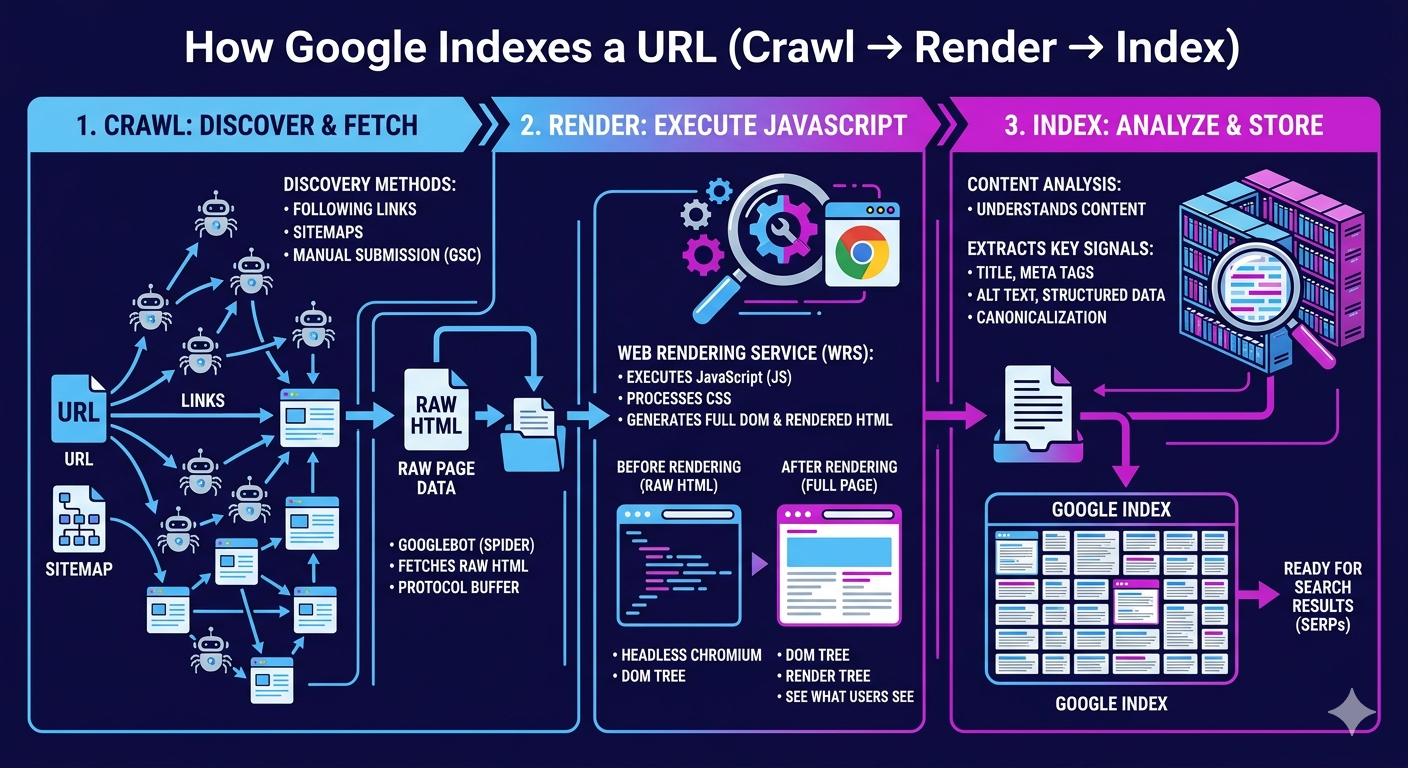
How does a URL actually make it into Google’s index? You move through a measurable pipeline: crawl → render → index. First, Googlebot discovers your URL via internal links, XML sitemaps, and external references, then schedules fetches based on crawl-frequency signals such as host responsiveness, change rate, and perceived importance. Next, Google’s rendering system executes HTML, CSS, and JavaScript to build the DOM, extract links, and evaluate content parity. This is where render optimization pays off: fast server responses, lightweight JS, and deterministic hydration reduce rendering queues and speed content understanding. Finally, Google canonicalizes, clusters duplicates, assigns signals, and writes the selected canonical into the index for retrieval. If you instrument logs, CWV, and server timing, you can quantify each stage’s latency and throughput.
Why Your URL Isn’t Indexed (Common Causes)
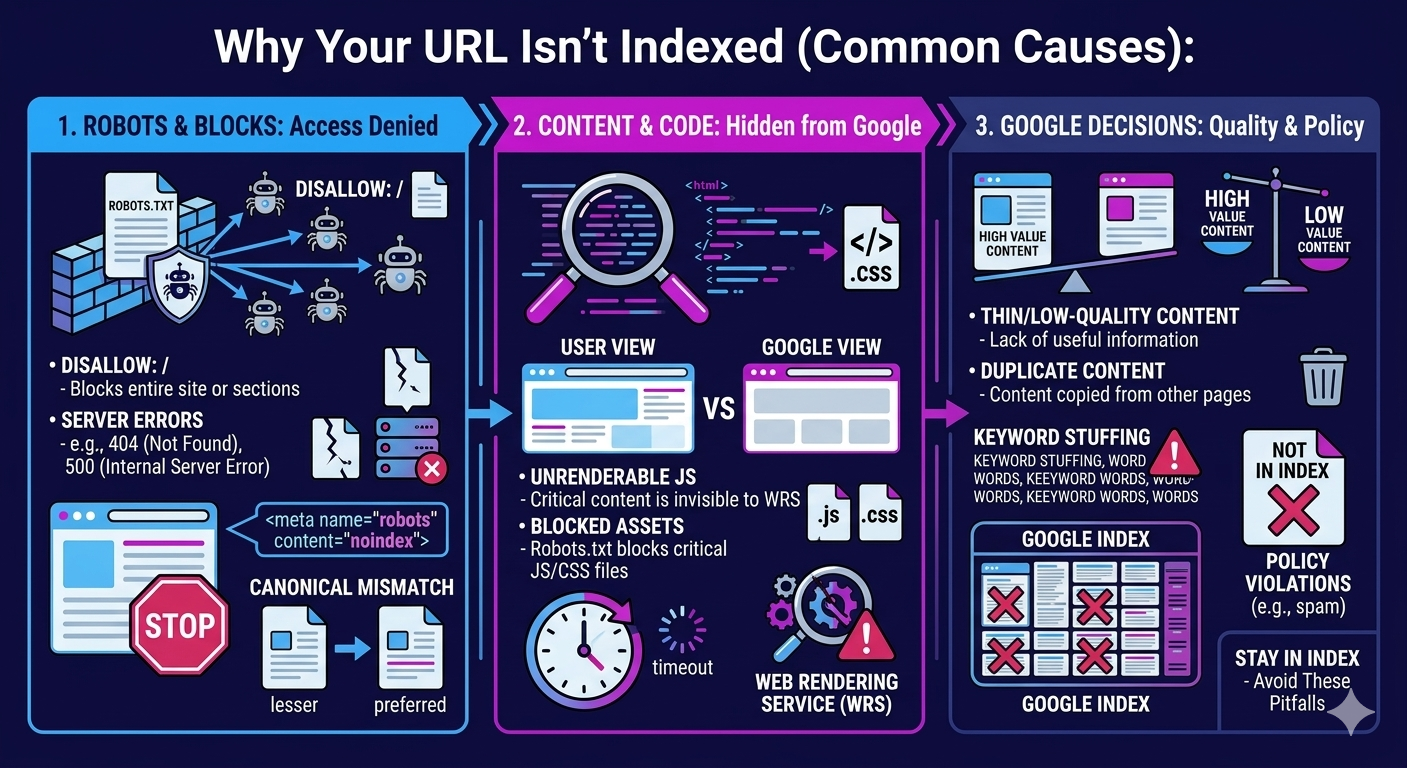
Why does a perfectly valid page still sit outside Google’s index days—or weeks—after launch? Usually, Google can’t justify allocating crawl budget or trust quickly enough. If your URL sits deep in the architecture, weak internal links and low PageRank flow slow discovery and recrawl. If you push thin or duplicated templates at scale, Google may defer indexing until it sees unique main content and satisfying UX signals.
You also trigger quality uncertainty with misleading metadata: titles, descriptions, and structured data that don’t match on-page entities reduce confidence and can stall indexing. International setups can misfire too; outdated hreflang clusters send conflicting geo-language targets, fragment signals, and delay consolidation. Finally, unstable performance—TTFB spikes, render-blocking JS, or hydration delays—keeps Googlebot from fully rendering, so indexing gets queued.
Remove Noindex, Robots.txt, Canonicals, and Errors
You can’t speed up Google indexing if your pages still ship with `noindex`, blocked `robots.txt` rules, or conflicting canonical tags. You’ll audit indexability signals (meta robots, X-Robots-Tag, robots.txt, rel=canonical) and remove anything that suppresses crawl and index coverage. Then you’ll fix crawl errors (3xx chains, 4xx/5xx, soft 404s) so Googlebot hits clean 200 responses and indexes the correct URL.
Fix Noindex And Robots
Where do most “indexing problems” actually come from? You ship pages with directives that block Google by design. Start by crawling your site and extracting meta robots and X-Robots-Tag headers. The highest-impact wins usually come from fixing noindex mistakes: templates that default to `noindex`, paginated pages set to `noindex, follow`, and staging rules leaking into production. Next, audit robots.txt pitfalls with the Robots Testing tool: broad `Disallow: /` rules, blocked CSS/JS that prevents rendering, and overzealous parameter blocks that hide valuable URLs. Align robots directives with your XML sitemap: only include indexable URLs, and remove blocked paths. Re-submit updated sitemaps in Search Console and monitor “Indexed” counts and crawl stats over 7–14 days.
Resolve Canonicals And Errors
After you’ve removed obvious indexing blockers like `noindex` and bad robots.txt rules, canonicals and hard errors usually explain the remaining “Discovered/Crawled—currently not indexed” URLs. Audit rel=canonical across templates, sitemaps, and HTTP headers, then align them to your preferred 200-status URL. Eliminate canonical conflicts where parameterized, paginated, or HTTP/HTTPS variants self-canonicalize inconsistently. Fix duplicate content by consolidating near-identical pages, enforcing one URL with 301s, and normalizing trailing slashes, case, and UTM parameters. Next, clear crawl errors: repair 4xx/5xx, redirect chains, soft 404s, and malformed internal links; Google deprioritizes unstable targets. Validate with Search Console’s URL Inspection and coverage trends, and re-submit affected URLs in updated sitemaps for faster recrawl and indexing.
Index Faster With Sitemaps and Internal Links
Once you’ve cleared noindex tags, robots.txt blocks, bad canonicals, and crawl errors, you can speed up Google discovery with XML sitemaps and internal links. You’ll submit clean, segmented sitemaps in Search Console, keep `<lastmod>` accurate, and ensure only 200-status, canonical URLs are included to maximize crawl efficiency. You’ll also build strategic internal link paths from high-authority pages to new URLs using keyword-relevant anchors, tightening click depth so bots reach priority pages faster.
Sitemap Submission Best Practices
Sitemaps act as your crawl roadmap, telling Google exactly which URLs to discover, prioritize, and recrawl. To index faster, you’ll treat sitemap submission like an engineering pipeline: clean inputs, measurable outputs, and rapid iteration. Keep only canonical, 200-status URLs, and sync lastmod to real content changes to improve crawl efficiency. When you deploy alternate internal links, update your sitemap in the same release so discovery signals align. Tune sitemap frequency based on change rate: news pages hourly, product pages daily, evergreen weekly.
- Submit to Search Console and verify successful fetch plus URL counts.
- Split sitemaps by type (posts/products) and cap each at 50k URLs.
- Monitor coverage, crawl stats, and lastmod drift; fix anomalies fast.
Strategic Internal Link Paths
A clean sitemap helps your URLs get discovered, but internal link paths determine how quickly Googlebot reaches them, how often it returns, and how much crawl budget you allocate to pages that matter. Build a shallow architecture: keep priority URLs within 3 clicks from the homepage and link them from high-traffic hubs to increase crawl frequency. Use Internal linking with descriptive, query-aligned anchors to reinforce topical relevance and speed re-crawls. Organize Content silos so category pages link downward (hub → spoke) and spokes cross-link only when semantically tight, reducing dilution. Add “new” and “updated” modules on indexable pages to surface fresh URLs immediately. Audit with log files: confirm bot hits rise after you add links, and prune orphan pages that never receive crawls.
Make Crawl Budget Work for Faster Indexing
How quickly Google indexes your URLs often comes down to crawl budget—the finite number of pages Googlebot will request from your site within a given timeframe based on demand and crawl capacity. You’ll win faster indexing by turning wasted fetches into high-value crawls using crawl budget optimization and batch indexing strategies. Focus on measurable signals in Search Console (crawl stats, response codes) and server logs (bot hits, latency), then iterate.
- Reduce crawl waste: block faceted duplicates, session URLs, and thin parameters with robots rules and canonicalization.
- Raise crawl efficiency: keep TTFB low, compress, fix 5xx/soft 404s, and stabilize 200-status templates.
- Prioritize indexable inventory: ship clean XML sitemaps, segment by recency, and purge orphaned, noindex, or redirected chains.
Do this, and Googlebot spends its quota where rankings move.
Use Links and Mentions to Speed Up Discovery
Why do some new URLs get discovered in hours while others sit unvisited for weeks? Googlebot follows pathways, so you need engineered discovery. Point internal links from high-crawl hubs (home, category, top posts) to transfer link equity and surface fresh URLs in the next crawl cycle. Use descriptive anchor text that matches primary queries to strengthen topical mapping and speed queueing.
Accelerate off-site discovery with fast-indexed mentions: press pages, partner resources, and social profiles that already earn frequent crawls. Even unlinked brand mentions can trigger re-crawls when they generate user signals like clicks, dwell time, and navigational searches. Track impact in Search Console: watch “Discovered—currently not indexed” shrink, monitor crawl stats, and iterate link placement based on fetch frequency and log-file hits.
Frequently Asked Questions
What’s the Difference Between Indexing and Ranking on Google?
Indexing gets your page stored in Google’s database; ranking decides where it appears in results—visibility vs performance. In indexing vs ranking, you first earn inclusion, then compete for position. You improve indexing by boosting crawl efficiency with clean sitemaps, fast responses, and strong internal links. You improve ranking by optimizing relevance, authority, and UX signals. If Google can’t index you, you can’t rank; if you’re indexed, you’re not guaranteed page one.
How Long Does Google Indexing Usually Take for a New URL?
Google indexing for a new URL usually takes anywhere from a few hours to several weeks. You’ll see quick timing when your site has strong crawl frequency, clean internal linking, and updated XML sitemaps. You can speed up discovery by submitting the URL in Google Search Console, ensuring fast server response times, and avoiding noindex/canonical conflicts. If Googlebot hits crawl budget limits or detects thin content, you’ll wait longer for inclusion.
Does Updating an Indexed Page Trigger Reindexing Automatically?
Yes, updating an indexed page can trigger reindexing automatically, but you can’t rely on it—“the squeaky wheel gets the grease.” Google’s crawlers recrawl based on crawl budget, internal link signals, sitemap freshness, and the frequency of detected changes. If you update indexed content, you improve the odds, yet timing varies from hours to weeks. You’ll speed it up by pinging an updated XML sitemap, tightening internal links, and using Search Console URL Inspection.
Can Rapid Indexing Techniques Violate Google’s Spam Policies?
Yes—rapid indexing techniques can violate Google’s spam policy if you automate manipulative signals. You risk issues when you mass-submit URLs, use low-quality sitemap spam, inject doorway pages, spin content, or abuse the Indexing API outside eligible content types. You stay compliant by prioritizing clean technical SEO: accurate canonicals, 200 status codes, fast, crawlable internal links, updated sitemaps, and an honest change frequency. Monitor Search Console crawl stats and manual actions.
Which Tools Best Track Indexing Status Across Many URLS?
Use Google Search Console’s Indexing reports + URL Inspection API for tracking status at scale; they’re your core stack. Like a telegraph tapping urgency, you’ll feel every index lag. Pair them with BigQuery (or Sheets) to log results, filter errors, and measure coverage deltas daily. Add Screaming Frog or Sitebulb to crawl, validate canonical/hreflang, and flag noindex. For bulk indexing workflows, monitor server logs and rank trackers’ URL discovery signals as well.
Conclusion
You’ve seen how Google indexes a URL—crawl, render, index—and why delays happen: noindex tags, robots.txt blocks, bad canonicals, and 4xx/5xx errors. To win rapid URL indexing, you’ll tighten technical SEO with clean XML sitemaps, strong internal links, and efficient crawl budget management. Then you’ll boost discovery using authoritative links and brand mentions. Treat indexing like a fast lane: remove roadblocks, improve signals, and Google’s bots will reach your pages sooner.