How to Use an Email Verification API in Real Workflows
An email verification API helps you improve list quality without turning verification into a manual task. Instead of checking addresses only when a problem appears, you can build verification directly into the systems that collect, store, and send email data. That matters because bad email data creates problems quickly. It drives up bounce rates, wastes rep time, weakens sender reputation, and makes it harder for legitimate messages to land in the inbox. When verification is built into the workflow itself, those issues are easier to prevent before they affect performance. The real advantage of an email verification API is flexibility. Rather than relying on CSV uploads or one-time cleanups, teams can run checks automatically wherever email addresses are being captured or used. That makes it possible to apply the same hygiene logic across forms, CRM syncs, outbound tools, and background maintenance jobs. This guide explains what an email verification API actually does, where it fits in your stack, how to implement it without slowing users down, which signals matter beyond a simple valid-or-invalid result, and what to compare when choosing a provider.
Why an API is different from one-off list cleaning
Manual list cleaning can still help, but it usually happens too late. By the time a team exports a file, verifies it, and uploads it back into a system, new bad records may already be entering through forms, enrichment tools, imports, or sales workflows.
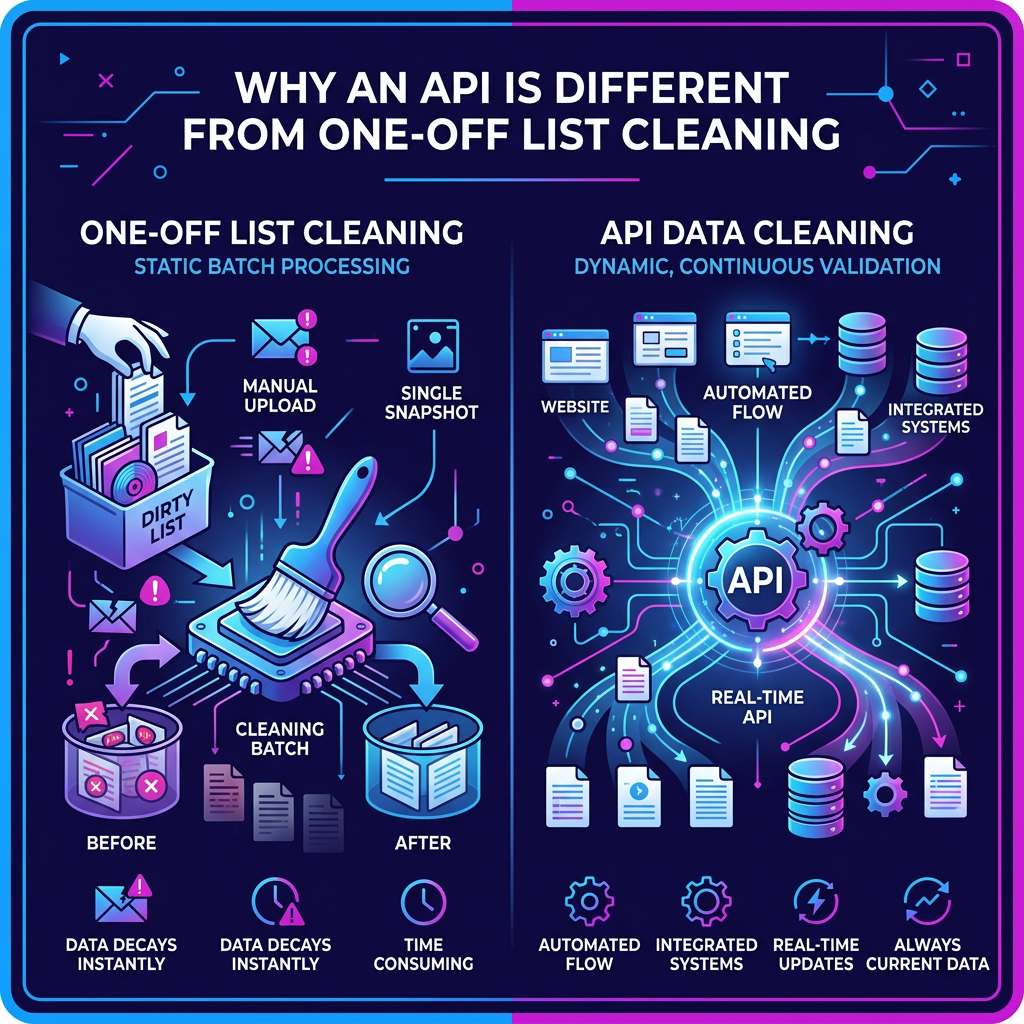
An API changes that model. Instead of treating verification as an occasional cleanup task, it turns it into an always-on decision layer. Your systems can ask the API whether an address should be accepted, reviewed, retried later, or suppressed altogether. Because the response is machine-readable, the same decision logic can be reused across multiple systems. A form can use it at sign-up. A CRM can use it during ingestion. A sales engagement platform can use it right before a cadence launches. A warehouse job can use it to refresh older records in bulk. That is what makes an API so useful: it lets one set of rules travel across your stack instead of living in one isolated tool.
What an email verification API actually returns
At a basic level, an email verification API returns a result that your systems can act on. That often includes a status such as valid, invalid, risky, unknown, or temporary failure. Better APIs usually go further and return a score, reason codes, and supporting signals your workflow can use. In practice, many teams store at least four fields on the contact record: status, score, reason, and checked_at. That way, every downstream system can work from the same source of truth rather than making a new decision every time. You will also usually see two operating models:
Immediate responses
Some APIs return the final answer in one request. In technical terms, that often returns a standard success response, making it easier to use for fast form checks and pre-send decisions.
Delayed or job-based responses
Other APIs accept the request first, then finish the check a little later. In those cases, the provider may ask you to poll for the result or receive it through a webhook. This is more common when verification takes longer or when the provider needs more time to reach a confident conclusion. For beginners, the simple way to think about it is this: some APIs answer right away, while others say, “I’ve started the job — come back in a moment for the final result.” Most teams also run these calls on the server or through a backend proxy rather than exposing the API directly in the browser. That protects credentials, gives you better control over retries and logging, and makes the integration easier to manage in production.
The four places verification usually belongs
Email verification is most useful where addresses enter your system, move through your stack, or are about to be mailed. In most B2B setups, that means four common placements.
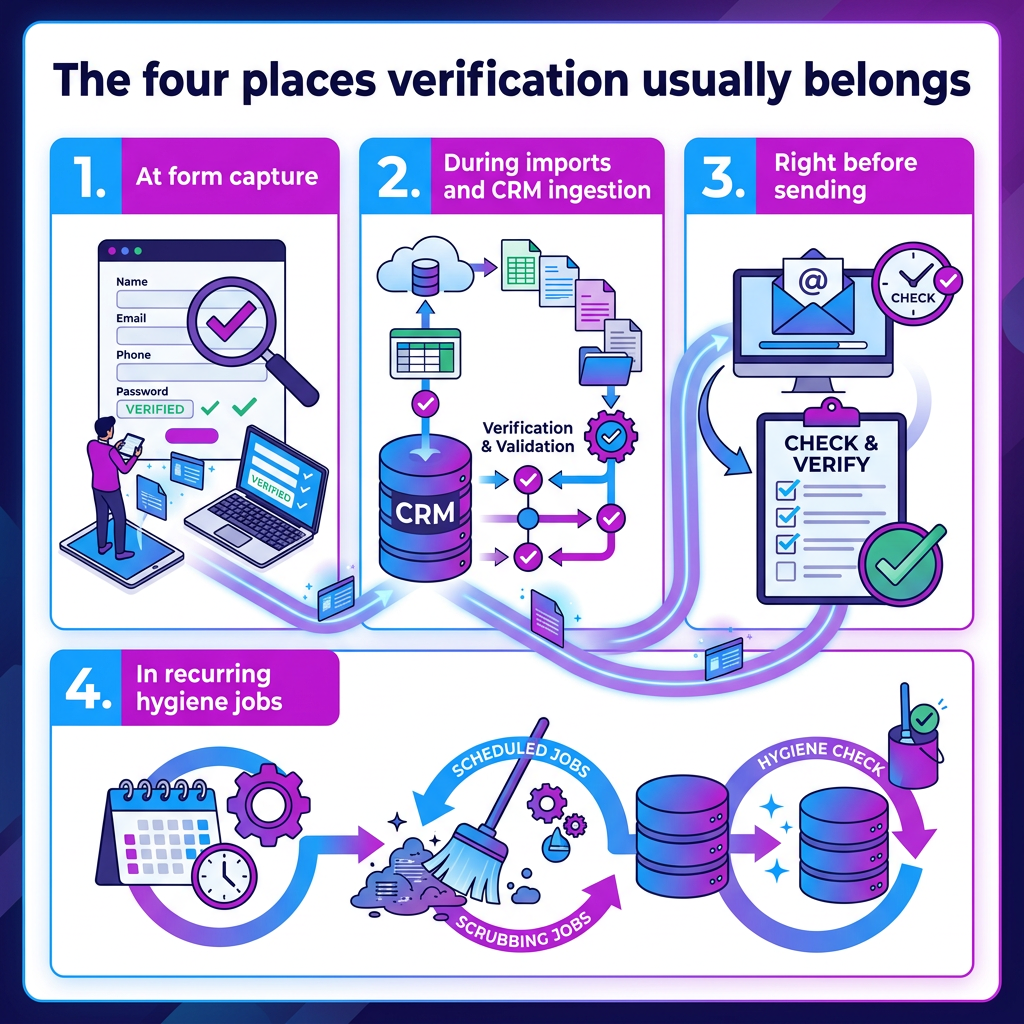
1. At form capture
The most obvious use case is real-time validation on demo requests, sign-up forms, gated content, and free-trial flows. The goal is to catch typos, fake addresses, throwaway domains, and obvious risks before they reach your CRM. The user experience matters here, so teams usually keep these checks fast. If the provider responds quickly, the workflow can act immediately. If the response is slow or uncertain, a common fallback is to accept the form, mark the record as pending, and queue a follow-up check in the background. That protects the user experience while preventing low-quality records from passing unreviewed.
2. During imports and CRM ingestion
Verification is also useful when records are entered through CSV uploads, partner feeds, enrichment vendors, or syncs from other systems. This is where teams often prevent bad data from spreading across the database. A practical setup is to write the verification result back to the contact record, then automate routing rules from there. Clean records can move forward. Risky ones can be quarantined or sampled for review. Clearly, bad ones can be suppressed before they ever touch segmentation, automation, or outbound workflows.
3. Right before sending
Pre-send verification is one of the highest-value placements for outbound programs. When a contact is about to enter a cadence in a platform like Outreach, Salesloft, or Close, the API can run a final check and block risky records before the message goes out. This matters because even a contact that looked safe a few weeks ago may no longer be safe today. Teams often use a short cache window here, usually around one to three days, so they avoid repeated lookups while still keeping the decision fresh enough to trust.
4. In recurring hygiene jobs
Verification also belongs in scheduled maintenance. Older cohorts, recently enriched lists, and legacy CRM segments can all be rechecked through monthly or quarterly batch jobs. This helps because B2B data naturally decays over time. People change jobs, mailboxes disappear, domains get reconfigured, and records that once looked fine become unreliable later. Regular background rechecks help keep a shared email-status field current across the rest of the stack.
How to implement it without hurting user experience
The main mistake teams make is treating every verification request the same way. A live form submission and a nightly batch job do not need the same timing, logic, or fallback behavior. A better setup keeps real-time paths fast and pushes heavier work into the background.
Set a strict time budget for real-time flows
For forms and pre-send checks, verification should happen within a tight response window. If the provider comes back quickly, great. If not, the system should fail gracefully. That usually means accepting the form, flagging the record as pending, and launching an asynchronous recheck. In an outbound workflow, it may mean pausing the contact briefly until the final status arrives. The key idea is simple: do not let a slow provider break your product experience or leave your reps stuck.
Retry temporary failures, not hard failures
Not every failed request means the same thing. Timeouts, provider errors, and temporary SMTP issues often justify a retry. Invalid syntax or obviously malformed addresses do not. That is why teams usually apply two or three retries with exponential backoff and jitter. The backoff prevents retry storms, while the jitter stops every request from retrying at the exact same moment.
Use circuit breakers when the provider gets shaky
If latency spikes or the error rate exceeds a safe threshold, a circuit breaker can pause live verification calls and move new requests to a short recheck queue. Once the provider stabilizes, the breaker closes automatically and normal traffic resumes. This sounds technical, but the idea is simple: when the service is having a bad moment, stop forcing live traffic through it and fall back safely instead.
Prevent duplicate checks
Double-clicks, repeated imports, and retried requests can create duplicate lookups. A common fix is to use an idempotency key based on the email address, the source, and a timestamp or request window. That way, repeated requests lead to a single decision rather than creating unnecessary noise and costs.
Cache recent results
Not every address needs to be re-verified every time it appears. Stable outcomes can usually be cached for longer periods, while uncertain states like unknown, greylisted, or temporary failure should expire sooner. That gives you two benefits: lower cost and more consistent decisions. It also helps every downstream system see the same truth instead of getting slightly different answers at different times.
Separate bulk work from live work
Large imports and background refreshes should not share the same processing path as live form submissions. Queues make it easier to handle bulk verification without overloading the application or depending on a single response window. Dead-letter queues also matter here. If a record fails repeatedly, it should be moved to a safe location for inspection rather than failing silently or blocking the rest of the batch.
Log what is happening
A verification layer should be visible to the team running it. That usually means logging request IDs, source system, latency, status codes, and the final outcome mix. If timeouts or temporary failures spike, that can be an early warning that a provider, DNS dependency, SMTP layer, or upstream data source is creating trouble.
For inexperienced users, this is one of the easiest ways to think about observability: you want to know whether the system is working, slowing down, or suddenly returning more risky results than usual.
Why “valid” is not enough
A binary result helps, but it does not fully protect an outbound program. Some addresses are technically deliverable and still dangerous to mail. That is why the best APIs return a richer risk layer instead of stopping at basic syntax, MX, and SMTP checks.
Spam-trap risk
Spam traps are dangerous because they can look like real inboxes and may not bounce at all. Better APIs distinguish between different trap signals, such as typo traps, recycled traps, or high-risk indicators that suggest the address should never enter a campaign.
Known complainers or likely manual reporters
Some addresses or domains are more likely to mark messages as spam. When that signal is available, it becomes much easier to exclude those records from broad outbound or high-volume cadences before they hurt placement for the rest of the program.
Disposable and temporary inboxes
Burner accounts may technically receive mail, but they rarely produce useful engagement. These are often better suppressed or routed into a lower-priority path, especially if your goal is to preserve sender reputation and campaign efficiency.
Role-based addresses
Mailboxes like info@, sales@, or hr@ are often shared, monitored differently, or more likely to trigger complaints in cold outbound. They may still have value in some workflows, but they usually deserve different handling than named contacts.
Catch-all addresses
This is one of the biggest pain points in B2B verification. A catch-all domain accepts mail for many or all addresses on the domain, which means the server response alone does not confirm whether a specific person actually exists there. That is why a simple domain-level label like accept-all is not very useful on its own. What teams really need is a contact-level decision that helps separate safer catch-all records from riskier ones. Without that, SDRs are often left guessing.
Greylisting and temporary SMTP behavior
Some verification failures are not final. A 4xx-style temporary response may simply mean the server wants you to retry later, while a hard failure usually means the address should be suppressed now. Good APIs help teams distinguish between the two so they do not drop valid contacts too aggressively or keep retrying hopeless ones.
Domain and infrastructure signals
Sometimes the problem is not the mailbox itself. Parked domains, broken MX records, strange DNS patterns, or unstable mail infrastructure can all signal future bounce or deliverability issues. Exposing these details as reason fields makes the result more actionable than a vague pass-or-fail label.
Engagement recency, where available
If your stack can incorporate lightweight engagement context, such as recent replies, clicks, or allow-listing behavior, that can help prioritize healthier contacts. It is not always part of a public API response, but when available, it can add useful context to routing decisions.
What to compare when choosing a provider
When teams evaluate email verification APIs, they often first focus on price or on whether a native integration exists. Those things matter, but they are rarely enough on their own. A better comparison starts with two broader questions: how accurate is the provider in hard B2B cases, and how easy is it to operationalize the API across your stack?
Accuracy in difficult cases
Catch-alls deserve special attention because that is where many tools become indecisive. The same goes for greylisting, temporary SMTP responses, and domains protected by stricter mail infrastructure. If the provider returns only a vague domain-level label or a large volume of unknown results, your team may still be left to make manual decisions.
Risk-signal depth
Base status matters, but so do the extra signals. Providers become much more useful when they return things like spam-trap risk, likely complainer signals, disposable-domain flags, role-account detection, and domain health indicators that your workflow can route on.
Real-time and bulk support
A good provider should make both use cases practical. That usually means a real-time endpoint for forms and pre-send checks, plus support for bulk jobs, asynchronous processing, webhooks, or polling for larger workloads.
Developer and operations support
Strong documentation, clear schemas, request logs, versioned APIs, sandbox or test keys, and stable identifiers make implementation much easier. Native integrations for systems like HubSpot or Salesforce can accelerate adoption, but they should be treated as a bonus rather than the whole reason to choose a vendor.
Compliance and operational controls
For many teams, privacy and security are part of the buying decision, too. It is worth considering data retention options, environment separation, auditability, network controls, and broader compliance readiness.
Pricing model
Pricing shapes behavior more than many teams expect. If the cost model makes your team ration calls, verification may stay a one-time cleanup task. If the pricing supports continuous usage, it becomes much easier to keep verification active across capture, enrichment, pre-send, and scheduled hygiene.
The simplest way to think about it
An email verification API is not just a tool for checking whether an address looks real. It is a way to build consistent decision-making into the systems that collect and send email data. For less experienced teams, that is the key takeaway. You do not need to think of verification as a one-off cleanup project. You can think of it as a layer that helps your stack decide, automatically and repeatedly, which addresses are safe to keep, which need review, and which should never be mailed. Once that logic is in place, the benefits spread across the rest of the workflow: cleaner CRM data, safer outbound, fewer wasted sends, and fewer deliverability problems created by bad records entering the system in the first place.