How to Build a Content Marketing Strategy Based on Customer Support Tickets
Most content marketing strategies start in the wrong place – keyword tools, competitor analysis, editorial calendars filled with topics that feel relevant but never quite land. The result is content that attracts traffic without attracting the right buyers.
There is a better starting point sitting inside your helpdesk. Every support ticket your team closes is a compressed signal: a real person, with a real problem, using the exact language they type into Google when they go looking for answers. A content marketing strategy based on customer support tickets is not a shortcut – it is a fundamentally more accurate way to understand what your audience actually needs, and what they will read, share, and act on.
This article explains how to build that strategy systematically, avoid the most common traps in ticket analysis, and translate raw ticket data into content that earns both rankings and trust.
What Support Tickets Actually Tell You (and What Most Teams Miss)
A ticket is not just a problem report. It contains at least three layers of information: the stated problem (what the user typed), the category it was filed under (how your team classified it), and the resolution pathway (what knowledge was needed to fix it). Most marketing teams, when they dig into ticket data at all, stop at the first layer.
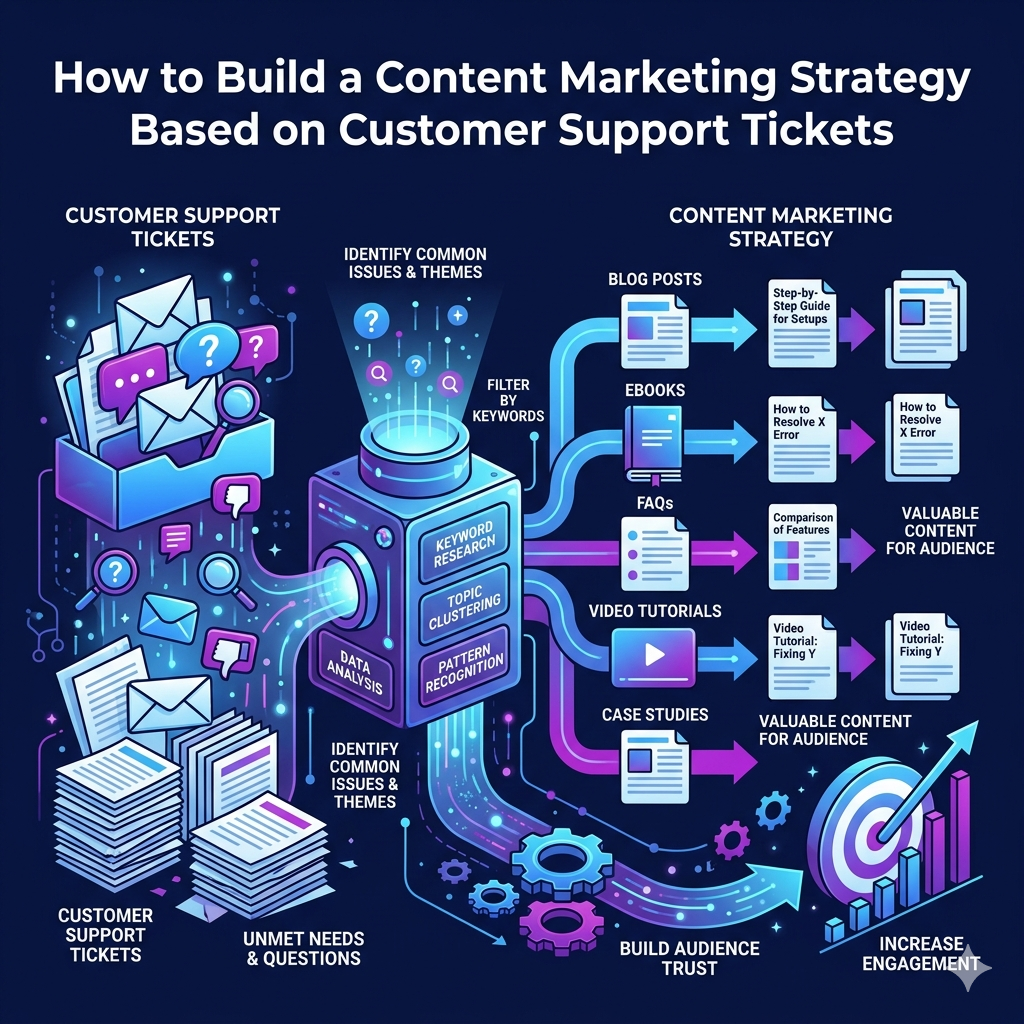
That is a mistake. The category structure and resolution data are often more valuable than the raw ticket text, because they reveal patterns across hundreds or thousands of individual requests – patterns that map directly to content topics with demonstrated search demand.
There is also a fourth layer that almost nobody mines: the questions a ticket raises that the user could not articulate. In practice, clients often arrive with a use case rather than a product requirement. A question like “Is there any way to bring another team onto IT without letting IT see their data?” does not mention data segmentation, enterprise service management, or access controls – but those are exactly the topics a well-structured content strategy would target. The ticket is the raw ore; the marketing team has to smelt it.
The Three-Stage Framework: Gather, Manage, Analyze
Before any ticket data becomes a content strategy, you need a functional categorization system in your helpdesk. Ticket-based content strategy fails when teams skip straight to publishing without first ensuring their data is sufficiently organized for analysis.
Think of the process in three stages. First, gathering: tickets arrive and are routed into categories. Second, managing: tickets are assigned, prioritized, and resolved, with resolution notes captured. Third, analyzing: reporting surfaces which categories are growing, which issues repeat, and which resolutions require documentation that does not yet exist publicly.
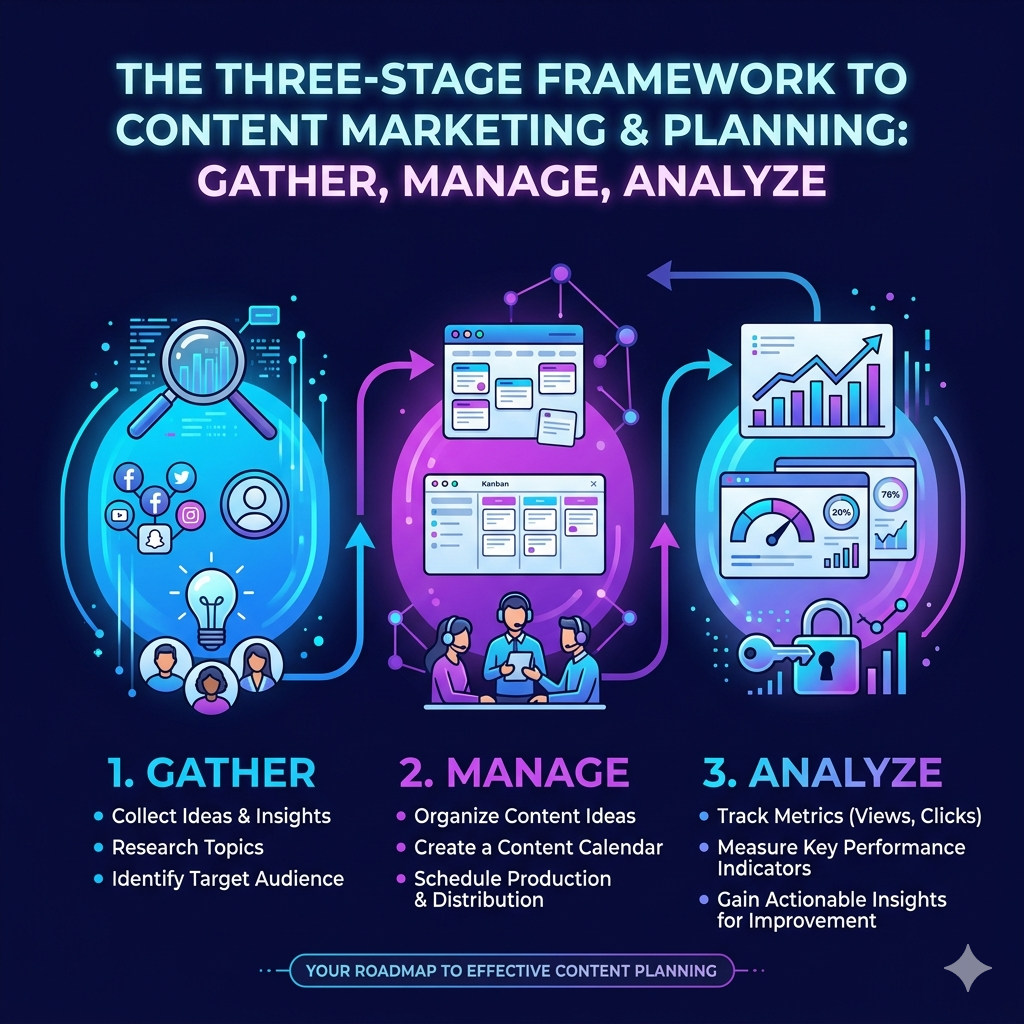
The third stage is where content strategy lives. If your categories are too granular – hundreds of micro-subcategories that made sense to an engineer but cannot be aggregated into themes – your reporting will be noise. If your categories are too broad, you lose the specificity that makes content genuinely useful. The target is a taxonomy that is granular enough to differentiate topics but structured enough to yield meaningful frequency counts. Roughly 15 to 40 parent categories, each with three to five subcategories, tend to work well for mid-market IT organizations.
Mapping Ticket Patterns to Content Opportunities
Once your categorization is sound, the mapping work is largely mechanical. High-frequency categories with low self-service resolution rates indicate that users are not finding answers on their own, usually because the content either does not exist, is hard to find, or does not match how users phrase the problem. Each of these scenarios is a content opportunity.

The table below illustrates the mapping logic across common IT service management ticket types, though the same framework applies to any industry or support function.
| Ticket Category | Signal It Sends | Content Type | Example Topic |
| Asset not found | Visibility gap in inventory | How-to guide/explainer | “How to audit hardware assets without spreadsheets.” |
| Software license error | License sprawl or miscounting | Checklist/decision guide | “Signs your software licensing is out of control.” |
| Password reset (high volume) | Self-service portal not adopted | Comparison of ROI post | “Why your help desk still handles password resets (and how to stop it).” |
| “Can HR see our tickets?” | Data segmentation confusion | Feature explainer/use case | “How to separate IT and HR data in a shared ITSM platform.” |
| Compliance/audit failure | Governance pressure rising | Strategic guide | “Building audit-ready IT records before the deadline.” |
| New team onboarding | ESM expansion interest | Thought leadership | “When should non-IT departments get their own service catalog?” |
Notice that the content type varies by the nature of the signal. A confusion-based ticket (user does not know a feature exists) calls for a feature explainer or use-case post. A volume-based ticket (same issue submitted repeatedly) calls for a comparison or ROI piece that makes the case for self-service or process improvement. A compliance-driven ticket (audit pressure, governance questions) calls for strategic, authoritative content aimed at buyers higher in the org chart.
Turning Ticket Language Into Search-Ready Copy
One of the most underappreciated advantages of a ticket-based content strategy is linguistic accuracy. Buyers do not always use the same terminology as vendors. A customer who needs enterprise service management might submit a ticket asking how to “add HR to the IT portal without sharing all the data.” They are describing ESM data segmentation without knowing the term.
This gap matters for SEO and for conversion. If your content only uses vendor vocabulary – terms like CMDB, ITIL-aligned workflows, or multi-tenant service catalogs – you will miss the segment of buyers who are in the problem-aware stage but not yet product-aware. Ticket language gives you the vocabulary needed to be problem-aware. Your job is to bridge both registers in the same piece of content: lead with the language of the problem (“how to stop IT from seeing HR payroll tickets”), deliver the solution using accurate product terminology, and use semantic anchoring so search engines understand the relationship between the two.
This is not keyword stuffing. It accurately represents the full spectrum of how buyers describe a problem at different levels of sophistication. Well-executed ticket-based content typically ranks for both the long-tail phrasing novice users type and the technical terms expert users search for.
Segmenting Ticket Data by Audience Before You Write
Not all tickets are created equal, and not all readers are the same person. A content marketing strategy based on customer support tickets only works if you segment the data by the type of submitter, because the same underlying problem manifests differently depending on the submitter’s role.
An IT operations manager submitting a ticket about repeated asset reconciliation errors is dealing with a day-to-day operational pain. An IT director flagging the same issue category in a quarterly review is framing it as a risk-management or ROI problem. The content that resonates with each persona has a different angle, different vocabulary, and different call to action – even though both pieces are ultimately rooted in the same ticket signal.
The table below maps persona to ticket pattern and recommended content angle, using the kinds of buyer profiles common in IT service management:
| Persona | Common Ticket Pattern | Their Underlying Goal | Content Angle That Converts |
| IT Ops Manager | Asset mismatches, missed SLAs, repeated manual tasks | Reduce reactive firefighting; prove workload to leadership | Practical guides: “How to get out of ticket triage mode.” |
| IT Director / CIO | Audit findings, vendor cost spikes, and tool sprawl complaints | Consolidate tools; demonstrate ROI to CEO or board | Strategic posts: “The true cost of running 4 separate ITSM tools.” |
| HR Manager (ESM user) | Data privacy questions, onboarding delays, and request routing failures | Isolate HR data; professionalize service delivery to employees | Use-case explainers: “Why HR needs its own service catalog.” |
For teams building on a platform like
For teams building on a platform like Alloy Software’s integrated ITSM and asset management solution, ticket data is particularly rich because it spans asset requests, change workflows, and multi-department service catalogs – giving marketers a cross-functional view of buyer pain that single-function helpdesks cannot provide.
The Role of Ticket Categorization in Long-Term Content Performance
Ticket-based content loses its edge over time if the underlying categorization system is not maintained. Categories that were accurate two years ago may no longer reflect current product capabilities, customer use cases, or support volumes. As your product evolves and your customer base grows, the ticket taxonomy should evolve with it.
Practically, this means scheduling a quarterly review of your top ten ticket categories – not just to check whether the content you published is performing, but to identify whether new patterns have emerged that warrant new content. Compliance deadlines in regulated industries, vendor price hikes that drive migrations, and new product launches all generate ticket spikes that serve as early signals of emerging content opportunities.
It also means treating your support team as a first-line content research function. Agents who resolve tickets daily have a granular understanding of where customers struggle, which documentation gaps lead to repeat contacts, and which newly released features are causing confusion. Building a lightweight feedback loop between support and content – even a shared Slack channel or a monthly thirty-minute debrief – tends to surface more actionable topic ideas than any keyword tool.
Common Pitfalls That Undermine Ticket-Based Content Strategy
Publishing at the Wrong Altitude
Tickets reveal operational pain. If every piece of content you produce addresses that pain at a how-to level, you will attract users who already have the problem but miss buyers who are still evaluating whether the problem is worth solving. Balance your ticket-derived topics with strategic content that speaks to the business case – written for directors and decision-makers, not just practitioners.
Ignoring Low-Volume, High-Value Tickets
Frequency bias is a real risk. Teams naturally gravitate toward the highest-volume ticket categories because the data signal is strongest. But low-volume tickets from enterprise accounts, from customers using advanced features, or from highly regulated industries often represent the highest-value buyer segments. A single ticket from a healthcare organization about HIPAA compliance and on-premise deployment preference is worth more content investment than fifty password reset tickets.
Treating Ticket Language as Final Copy
User-submitted ticket text is raw material, not finished prose. It contains typos, half-articulated questions, and internal jargon specific to the submitter’s organization. The job of the content team is to extract the underlying question, validate it against search data, and write to a standard that represents genuine expertise – not to reproduce support-ticket language verbatim. The language is a compass, not a script.
A Practical Starting Point: Six Steps to Your First Ticket-Derived Content Brief
- Pull three to six months of closed tickets and export by category and volume.
- Identify the top five categories by ticket count and filter for repeat submitters – these indicate self-service gaps.
- For each category, extract three to five representative ticket titles or descriptions that reflect how users phrase the problem.
- Map each category to a persona and buying stage (awareness, consideration, decision).
- Run the extracted phrases through a keyword tool to validate search volume and identify semantic variations.
- Write one content brief per category, noting the target persona, primary keyword, ticket-derived language to incorporate, and the existing internal knowledge base article (if any) that could serve as a source.
Conclusion: The Support Queue Is a Research Department
The instinct to build content strategy from keyword data alone is understandable – it is fast, scalable, and produces defensible editorial calendars. But it systematically underweights the signal that is hardest to replicate: documented evidence of what your actual buyers struggled with, in their own words, under real conditions.
A content marketing strategy based on customer support tickets does not replace keyword research or competitive analysis. It grounds those inputs in reality. When you know that your fastest-growing ticket category is compliance-related audit failures, and you know that the buyers submitting those tickets are IT directors at mid-market healthcare organizations, your keyword research becomes targeted rather than exploratory. You are looking for the right words for a problem you already understand, rather than guessing which problems are worth covering.
The data is already there. Most organizations are sitting on one to three years of ticket history that has never been analyzed for content value. Starting there, before adding more tools or budget, is almost always the highest-ROI move for a content team.
Frequently Asked Questions
It means turning your support inbox into a goldmine of content ideas. Every question, complaint, or “how do I do this?” moment is real insight into what your audience actually cares about. Instead of guessing what to write about, you’re creating blog posts, FAQs, and videos based on real conversations happening with your customers every day.
Because they cut through the noise. Support tickets show you exactly where customers are confused, frustrated, or curious—no assumptions needed. This makes them one of the most reliable sources for content ideas, helping you create content that’s genuinely helpful instead of just filling space on your blog.
Support tickets naturally reveal long-tail keywords and real search intent. If multiple customers are asking the same question, chances are others are typing that exact question into Google. By turning those questions into content, you’re aligning your site with how people actually search—giving you a much better shot at ranking and driving qualified traffic.
Pretty much everything. You can turn recurring questions into blog posts, build out detailed FAQ pages, create help center articles, record quick how-to videos, or even repurpose answers into social media content. If your support team is answering it repeatedly, it’s content waiting to happen.
Look for patterns, not one-offs. Focus on questions that come up repeatedly, issues that cause confusion, or topics that require longer explanations from your team. If your support staff has answered the same thing more than a few times, that’s a clear signal it deserves a permanent home on your website.
Absolutely—and it’s becoming a huge advantage. AI tools can scan large volumes of tickets, identify trends, group similar questions, and even suggest content topics. Instead of manually digging through conversations, you can quickly uncover what matters most and prioritize content that will have the biggest impact.
It shifts your business from reactive to proactive. Instead of waiting for customers to reach out with questions, you’re answering them ahead of time through helpful content. That means fewer support tickets, faster solutions, and a smoother experience overall—which customers definitely notice.
They should—and honestly, they need to. Support teams hear the real questions, while marketing teams know how to turn those insights into content that attracts and converts. When those two teams work together, you get content that’s not only optimized for search but also genuinely useful.
Regularly, not just once and done. Customer questions evolve as your products, services, and industry change. Keeping an eye on new support trends ensures your content stays relevant, accurate, and aligned with what people need right now—not what they needed a year ago.
Collecting all this valuable data… and then doing nothing with it. Many businesses have tons of support insights sitting in their help desk but never connect the dots to content marketing. The result? Missed SEO opportunities, repeated customer questions, and a lot of avoidable frustration on both sides.