Difference Between SEO and Google Analytics
SEO helps you win organic search by researching keywords, mapping intent, optimizing pages, and earning authority to lift rankings, impressions, and clicks. GA4 is your measurement layer, so you can track what happens after the click: sessions, engagement, events, conversions, revenue, and attribution paths. You use SEO to drive qualified traffic and GA4 to prove ROI, spot funnel drop-offs, and prioritize fixes by landing page. Keep going to see the exact metrics and workflow.
SEO vs Google Analytics: What’s the Difference?
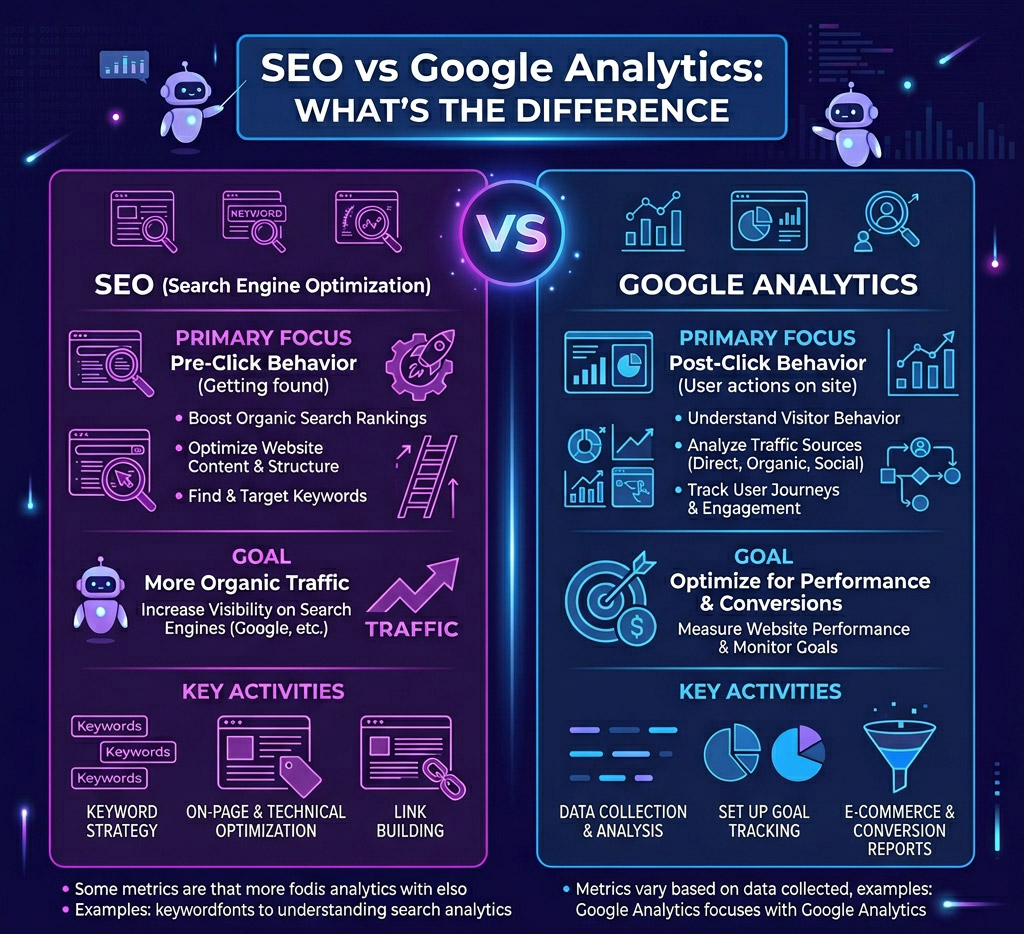
Where does SEO end and Google Analytics begin? SEO is your growth engine: you research keywords, map intent, optimize pages, and earn authority to lift rankings and clicks. You’re changing inputs—content, technical health, internal links, schema, and speed—to influence search visibility and demand capture. Google Analytics is your measurement layer: you track sessions, engagement, events, conversions, and revenue to validate what’s working. You’re not “doing” ranking work; you’re quantifying outcomes, diagnosing drop-offs, and running an insightful critique of landing-page performance. SEO answers “How do you win search?” Analytics answers “What did users do after they arrived?” Together, you sharpen audience targeting, prioritize high-value queries, and iterate faster with tests, dashboards, and KPI-driven decisions.
Do You Need SEO, GA4, or Both?
If you’re focused on ranking for target keywords and capturing high-intent organic traffic, SEO alone can be enough to drive measurable growth. When you need conversion, retention, and revenue attribution across channels and events, you can’t skip GA4. Use both together to connect keyword performance to on-site behavior, then optimize content, UX, and funnels based on hard metrics.
When SEO Is Enough
Sometimes you don’t need GA4 to make smart growth decisions—SEO alone can be enough when your goal is straightforward organic visibility and you can validate performance with search-focused metrics. If you’re launching a lean content site, local service page, or niche blog, focus on SEO basics: query intent, technical hygiene, internal linking, and SERP-ready titles. You’ll measure wins through rankings, impressions, clicks, CTR, and indexed pages, then iterate fast with page-level optimizations. Use keyword clusters, topical authority maps, and competitor gap scans to prioritize pages that can move from positions 8–20 into the top 3. Even without GA4 fundamentals, you can still run performance sprints: ship updates, watch Search Console trends, and scale what compounds.
When GA4 Is Essential
Although SEO gets you discovered, GA4 becomes essential the moment you need to prove what that visibility turns into—leads, revenue, retention, and CAC. You’ll rely on event-based tracking to map signups, demo requests, add-to-carts, and purchases, then quantify which landing pages and keywords drive high-intent sessions. When stakeholders ask, “What’s the ROI?” GA4 answers with conversion rates, attribution paths, cohort retention, and LTV signals you can act on fast. You also need GA4 when product changes, UX tests, or pricing experiments demand clean baseline metrics and anomaly alerts. If you’re running SEO audits, GA4 validates whether fixes lift engaged sessions and conversions, not just rankings. Prioritize GA4 privacy controls to measure responsibly while staying compliant.
Using Both Together
Where do SEO and GA4 deliver the biggest lift when you run them together? You connect intent to impact: SEO targets high-value queries, while GA4 proves which landing pages drive engaged sessions, revenue, and retention. You’ll stop chasing SEO myths because you’ll validate rankings against conversion rate, assisted conversions, and cohort behavior.
- Map keyword clusters to GA4 events and funnels to spot drop-offs by query intent.
- Use GA4 attribution and landing-page reports to prioritize technical fixes and content refreshes.
- Personalize data ethics: minimize data, respect consent, and measure outcomes without over-collecting.
If you need discoverability, you need SEO. If you need performance proof, you need GA4. If you want compounding growth, you need both—iterating weekly on metrics, not opinions.
What SEO Is Responsible for (Rankings to Clicks)
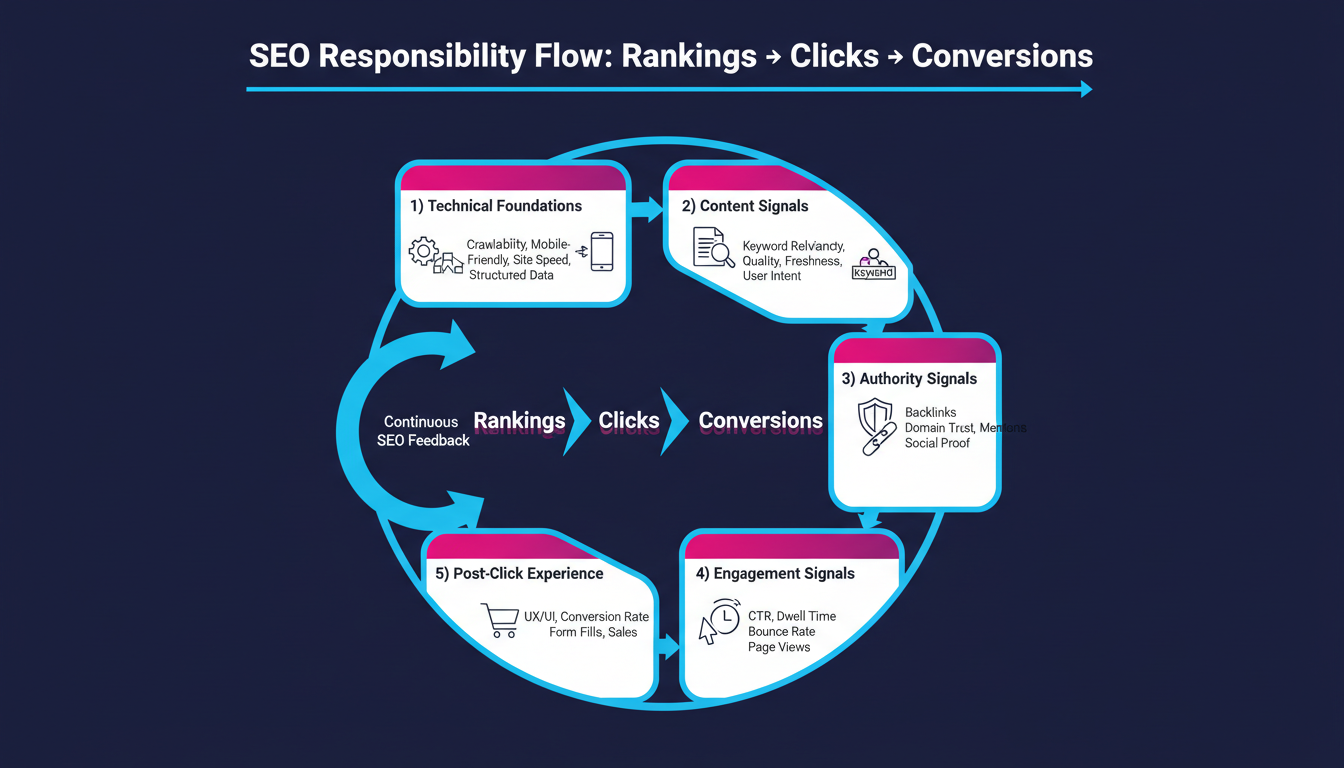
How does SEO move the needle from rankings to real traffic? You engineer visibility by targeting high-intent keywords, mapping them to pages, and tightening on-page signals—titles, headers, internal links, and schema—so search engines understand relevance fast. You improve crawlability and site speed, remove index bloat, and earn authoritative links that strengthen your competitive position. You’re also responsible for turning positions into clicks. You test SERP messaging with compelling titles and meta descriptions, align content to search features, and defend against cannibalization so one page wins. You monitor SEO performance through shifts in rank distribution, impression share, and click-through rate, then iterate before competitors react. When algorithm updates hit, you audit content quality, intent match, and link risk, and you ship fixes quickly.
Here’s a bullet point list on What SEO Is Responsible For (Rankings to Clicks):
- Keyword Research and Targeting – Identifying the right search terms that align with user intent and business goals.
- On-Page Optimization – Optimizing titles, meta descriptions, headers, and content for relevance and clarity.
- Technical SEO – Ensuring website crawlability, indexability, and fast loading speeds to support search engine rankings.
- Content Quality and Relevance – Creating valuable, well-structured content that satisfies search intent.
- User Experience (UX) Optimization – Enhancing site navigation, layout, and mobile responsiveness to keep visitors engaged.
- Internal Linking – Structuring links within a site to distribute authority and guide users toward key pages.
- External Backlink Strategy – Building high-quality inbound links from authoritative websites to increase trust and ranking power.
- Schema Markup – Implementing structured data to help search engines understand content and display rich results.
- Local SEO (if applicable) – Optimizing for local search intent through Google Business Profiles and localized content.
- Click-Through Rate (CTR) Optimization – Crafting compelling meta titles and descriptions that attract clicks from search results.
- Brand Visibility in SERPs – Managing how your brand appears across multiple result types (organic, featured snippets, etc.).
- Performance Tracking – Monitoring rankings, impressions, clicks, and conversions through tools like Google Search Console.
- Continuous Improvement Cycle – Using performance data to refine keyword targets, improve content, and boost click engagement.
What Google Analytics (GA4) Measures on Your Site
GA4 shows you what happens after the click by tracking user engagement metrics like engaged sessions, engagement rate, and average engagement time. You can tie those signals to your target keywords and landing pages to see which pages keep users active and which ones bleed attention. It also maps traffic sources and user paths—organic, paid, referral, email—so you can attribute performance and optimize the journeys that convert.
User Engagement Metrics
Ultimately, user engagement metrics show whether your traffic actually sticks around and takes meaningful actions. In GA4, you’ll optimize beyond clicks by tracking how long users stay engaged, what they do, and where they drop off. Set engagement benchmarks per page type, then iterate faster with experiments that improve UX and content freshness.
- Engaged sessions: confirm real attention (10+ seconds, 2+ views, or a conversion).
- Engagement rate & average engagement time: validate the impact of messaging, layout, and speed.
- Events & conversions: measure actions like scrolls, sign-ups, downloads, and purchases.
Use these signals to prioritize high-leverage pages, tighten funnels, and prove performance gains with hard numbers. When engagement rises, your SEO work and on-site experience reinforce each other.
Traffic Sources And Paths
Where does your best traffic actually come from—and what do users do after they land? In GA4, you’ll pinpoint traffic sources by channel, campaign, and medium, so you can scale what converts and cut what leaks budget. You’ll compare organic search vs paid, referral, social, email, and direct, then validate performance with revenue, leads, or key events tied to each source. Next, path analysis shows the real user journey: entry page → scroll → product view → add-to-cart → purchase, or the drop-off points that kill ROI. You’ll surface loops, dead ends, and high-friction steps, then test smarter navigation, internal links, and CTA placement. When you connect sources to paths, you optimize acquisition and on-site flow as one system.
Where SEO Ends, and GA4 Begins (A Quick Boundary Map)
How do you draw a clean line between ranking work and measurement work? You treat SEO as the set of actions that change discoverability, and GA4 as the system that validates outcomes. SEO ends when you’ve shipped indexable pages, mapped intents to keywords, tightened internal links, and aligned SEO timing with crawl and release cycles. GA4 begins when you instrument events, define conversions, and quantify revenue impact while respecting GA4 privacy and consent mode.
- SEO owns inputs: content briefs, technical fixes, structured data, SERP-focused targeting
- GA4 owns outcomes: engagement, conversion rate, LTV, attribution-ready event data
- Shared layer: hypothesis → test → iterate, using dashboards to rank experiments by lift
If rankings rise but conversions don’t, GA4 tells you where the funnel leaks fast.
Where Google Search Console Fits in SEO Reporting
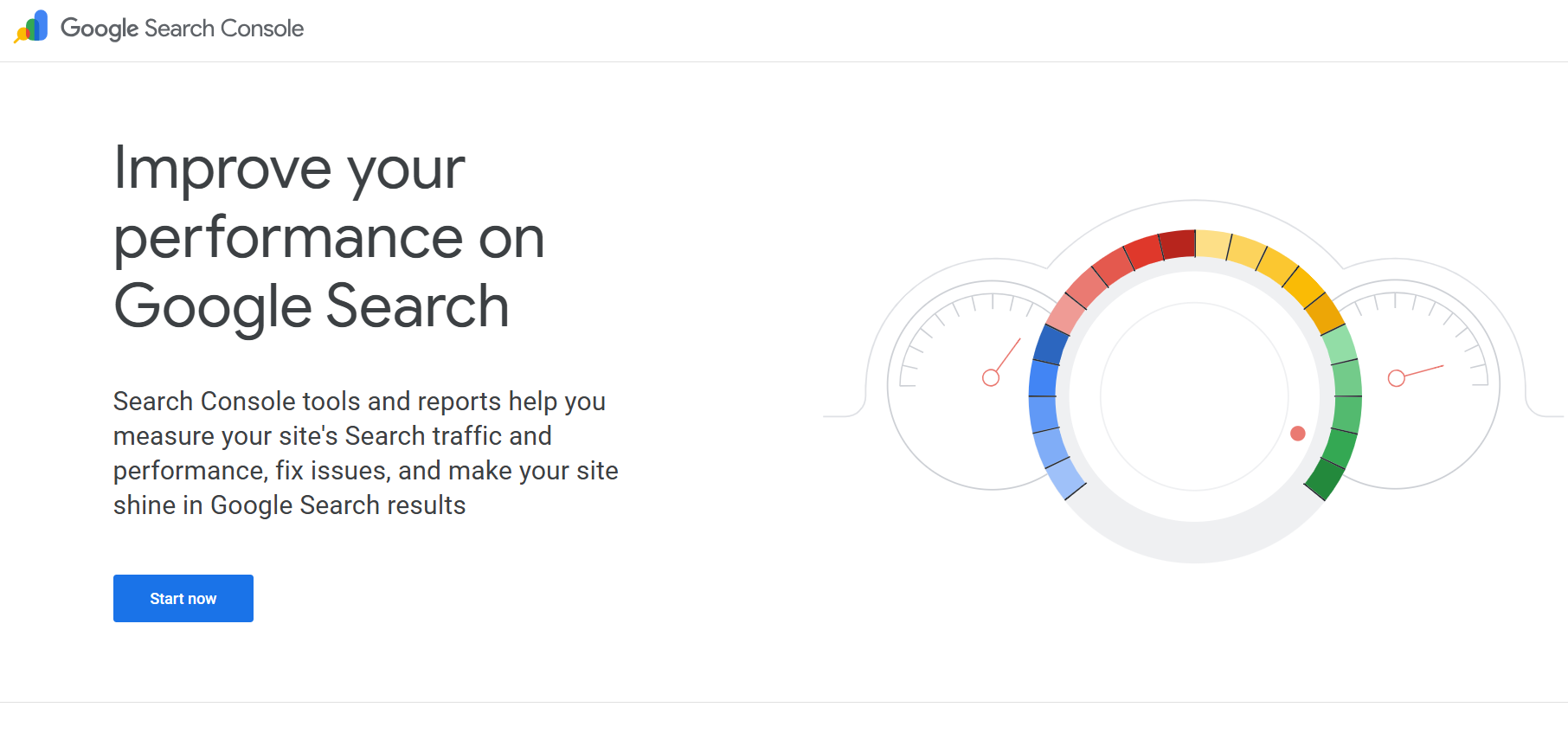
Because GA4 can’t tell you how Google discovers and ranks your pages, Google Search Console (GSC) becomes your SEO reporting source of truth for query-level performance. You use it to see which keywords trigger impressions, where you rank, and how often searchers click—then you map those insights to landing pages you’re optimizing. GSC also flags index coverage, sitemap ingestion, and URL inspection signals, so you can validate that technical changes ship and stick. When you connect GSC to GA4 dashboards, you create a tighter feedback loop: query intent flows into content experiments, and page-level engagement validates your next iteration. Treat GSC exports as your performance dataset for SEO metrics, and you’ll prioritize fixes and growth bets with less guesswork and faster cycles.
SEO vs GA4 Metrics That Actually Matter
Why do some “wins” in GA4 still translate into flat organic growth? Because GA4 basics measure on-site behavior, while SEO basics track how you earn demand in search. If you optimize for engagement without ranking leverage, you’ll boost events but not queries, clicks, or qualified sessions.
To stay performance-oriented, align metrics to the search funnel and intent. Prioritize what moves visibility, then validate what converts after the click.
- SEO: non-brand impressions, top-3 keyword coverage, CTR by query/page
- GA4: organic session quality (engaged sessions per user), new users from organic, landing-page conversion rate
- Cross-check: content-to-keyword mapping, device/location splits, time-to-convert for organic
Treat GA4 as your experimentation layer and SEO as your distribution engine—then iterate with fast, data-led sprints.
How to Prove SEO ROI in GA4 (Step by Step)
Where does SEO revenue actually show up in GA4 once you strip out vanity traffic? Start by defining conversions: mark purchase, lead, or signup events as key events, then assign values (revenue or lead value). Next, verify organic sessions: use Traffic acquisition and filter Session default channel group = Organic Search. Then connect outcomes: open Advertising > Attribution, choose a data-driven model, and compare Organic Search across paths to see assisted versus last-click impact—this is your GA4 attribution baseline. Build a report: create an Exploration with a Landing page + query, sessions, key events, revenue, and conversion rate, then segment Organic Search only. Finally, compute seo ROI: (SEO-attributed value − SEO costs) ÷ SEO costs, and trend it weekly by priority keywords.
SEO + GA4 Mistakes to Avoid (and a Weekly Workflow)
How do SEO teams lose the GA4 thread even when rankings climb? You chase position gains while conversions slip because you trust SEO myths and GA4 myths instead of validated events, clean attribution, and segmented intent. Avoid the traps that distort keyword performance and budget decisions:
- You don’t map GA4 events to SEO goals (lead, demo, purchase), so “traffic” hides revenue.
- You rely on default channel grouping, so Organic Search cannibalization looks like “Direct” lift.
- You skip query-to-landing-page analysis, so winning keywords don’t match converting pages.
Weekly workflow: Monday audit tags, consent, and event fires; Wednesday review organic cohorts by landing page and device; Friday correlate Search Console clicks, GA4 engaged sessions, and conversion rate, then ship one test to improve funnel velocity.
Conclusion
SEO gets you found; GA4 proves what happens next. Think of SEO as the engine that drives qualified clicks, and GA4 as the dashboard that shows conversions, revenue, and drop-offs. When you connect rankings, CTR, and landing pages to engagement rate, key events, and attribution, you stop guessing and start optimizing. Use Search Console for query-level insights, then validate outcomes in GA4. Run this loop weekly, and ROI becomes measurable.